Showing posts with label amazon. Show all posts

Monday, September 29, 2025

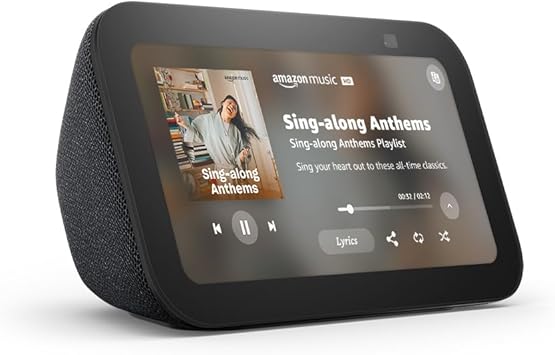
Amazon Echo Show 5 (newest model) — in-depth review


Overview
The Echo Show 5 (newest model) is Amazon’s compact smart display that aims to squeeze better sound and smarter Alexa functionality into a tiny footprint. It keeps the same 5.5-inch touchscreen size as previous small Show models but upgrades the audio, microphones, and responsiveness so the little bedside or countertop device feels more capable than its size suggests.

Design and build
Physically, the new Show 5 keeps a clean, unobtrusive design: a rounded rectangular display mounted on a soft-touch fabric-backed speaker bar. The 5.5-inch screen is small by tablet standards but excellent for glanceable information — weather, timers, calendar items, commute times, and media controls — and its screen tilt and compact footprint make it ideal for nightstands, small kitchen counters, or an office desk. The build quality feels solid and intentionally non-flashy; Amazon designed this model to blend into the background and act as an always-available assistant.

Display and UI
The 5.5-inch display is sharp enough for headlines, album art, and video calls, though it’s not meant for long-form video watching. Alexa’s visual interface remains the same familiar mix of cards, widgets, and voice-driven controls. Day-to-day interactions are fast: swipe to the camera, pull up smart home controls, or tap a routine. The small screen is a feature, not a bug — it’s meant for quick glances and lightweight interactions rather than extended reading or streaming.

Audio performance
This is where Amazon pushed the most noticeable changes. The newest Show 5 advertises deeper bass and clearer vocals, and in real listening tests that translates to firmer low-end presence and more intelligible mids for speech and podcasts. For a device this size the bass is surprisingly present — it won’t shake a room, but background music, morning news, and spoken-word content are fuller and less tinny than on older Show 5 models. At higher volumes the sound stays reasonably coherent; there’s warmth without becoming muddy. If you want fuller, room-filling audio, a larger Echo or a dedicated speaker will still beat the Show 5, but for a bedside or kitchen unit the sound is a clear step up.

Microphone, voice recognition, and Alexa responsiveness
Amazon also improved the microphone array and the overall responsiveness of Alexa. The Show 5 hears voice commands reliably from across a small room, and routines or timers trigger quickly. The combination of improved microphones and software refinement means the device is less likely to miss you when you call for Alexa from another side of the kitchen. As with other Echo devices, performance will vary with ambient noise levels, but the latest Show 5 is better at distinguishing voice from background sound than earlier small displays.

Camera and privacy
The Show 5 includes a front-facing camera that supports video calling and basic framing for calls or quick selfies. It also includes the hardware privacy shutter so you can physically block the camera when you want privacy. Amazon’s privacy controls — microphone and camera mute buttons and an easy-to-engage shutter — are straightforward, and the device makes it clear when the camera or mic is active. For most buyers using the Show 5 for quick video chats, doorbell camera feeds, and occasional selfies, the camera is perfectly adequate.

Smart home integration and features
As with other Echo devices, the Show 5 functions as an Alexa hub for controlling lights, plugs, thermostats, cameras, and other smart devices. The visual controls are handy: tap to toggle lights, view a camera feed, or run a routine. It also supports the same Alexa skills and media services as other Amazon smart displays — music from major services, podcasts, and limited video streaming — making it a very practical control surface for a smart home without needing a larger display.

Setup and day-to-day use
Setup is simple: plug in, follow the on-screen steps, sign into your Amazon account, and configure basics like Wi-Fi and voice profiles. The device arrives with a polished out-of-box experience and integrates quickly with existing Amazon services. Once configured, the Show 5 is low maintenance: firmware updates happen automatically, and Alexa routines or Quick Commands let you automate morning or evening tasks with a single phrase.

What’s good
The new Echo Show 5 offers a compact display with significantly improved sound for its size, better voice pickup, and the usual deep Alexa feature set. It’s affordable, unobtrusive, and ideal for bedrooms, small kitchens, or home office desks. If you want an inexpensive way to get visual Alexa interactions and noticeably better audio than earlier tiny smart displays, this model does the job well.

What could be better
The small screen limits what you can do visually: long videos, newspapers, or multitasking on the display aren’t comfortable on 5.5 inches. Audiophiles or people expecting powerful bass will still prefer larger dedicated speakers. Also, if you need a hub with advanced local smart home processing or Matter thread support, those higher-end features live in larger or more expensive Echo devices. Finally, the device’s true value depends on how embedded you are in the Amazon ecosystem; if you don’t use Amazon Music, Prime, or Alexa much, some features will be less compelling.

Price and value
Amazon positions the Echo Show 5 as an entry-level smart display with a price that reflects its size and market positioning. Given the upgraded audio and improved microphones, it represents good value for users who want a capable, compact Alexa display at a modest cost. Pricing often fluctuates with sales and promotions, making it even more attractive at discounted rates.

Who should buy it
Buy the Echo Show 5 if you want an affordable bedside or counter Alexa device with a screen and better-than-expected audio. It’s great for people who use voice timers, video calls, quick video streaming, smart home control, and music or podcast listening in small spaces. Skip it if you need a large display, very powerful speakers, or if you prefer an assistant ecosystem outside of Amazon/Alexa.

Verdict
The newest Echo Show 5 is a smart little upgrade. It doesn’t reinvent the category, but it tightens the core strengths: clearer audio, improved voice pickup, and the convenience of a glanceable display with Alexa always available. For anyone who wants a compact smart display with personality and better sound than previous small models, it’s a solid, affordable pick that makes the most sense as a bedside companion, kitchen helper, or desktop assistant.

See The Echo Show 5 On Amazon!

Thursday, September 11, 2025

Amazon Fire Max 11 — in-depth review


Amazon’s Fire Max 11 arrives as the company’s biggest, most ambitious Fire tablet: an 11-inch slab that aims to be an all-rounder for streaming, reading, light productivity, and casual gaming. I’ve tested the 64 GB model and spent time with the display, accessories, battery, and day-to-day software to get a sense of what this tablet is good at — and where it still falls short.

First impressions and design

Out of the box the Fire Max 11 feels noticeably more premium than Amazon’s smaller Fire tablets. The frame is clean and simple, with narrow-ish bezels for this class, a matte back that resists fingerprints, and a weight that’s comfortable for long reading or streaming sessions. Build quality is solid and it doesn’t creak, and buttons (power, volume) feel satisfyingly clicky. The overall aesthetic leans utilitarian rather than flashy, which suits its role as a multimedia workhorse.

The display — vivid, big, and easy on the eyes

The headline here is the 11-inch vivid display with a 2000 × 1200 resolution. The screen is bright enough for indoor use, and colors pop more than you’d expect from a Fire tablet. Text is crisp for e-books and webpages, and video playback looks satisfying on this size — movies and TV shows fill the screen without feeling pixelated. Amazon also includes a low-blue-light mode that reduces eye strain during long reading sessions.

Performance — snappy for everyday tasks, not a flagship powerhouse

Under the hood the Fire Max 11 uses an octa-core processor paired with 4 GB of RAM. That combination delivers smooth performance for streaming, web browsing, and most apps from Amazon’s app catalog. App launching and video playback are quick; switching between a few apps is fine, but pushing heavy multitasking or demanding 3D games will expose the tablet’s limitations. For its target audience — casual users who want a big screen for media, web, and light productivity — performance is competent and in many cases pleasantly quick.

Battery life — excellent for a day away from the charger

Amazon claims up to 14 hours of mixed-use battery life, and in real-world use that number is realistic if you’re mostly reading, browsing, or streaming intermittently. Continuous heavy gaming brings the number down, but for general day-to-day use the tablet easily carries you through long flights, workdays, or weekends at a cafĂ©. That longevity is one of the device’s most practical advantages.

Cameras, sound, and speakers

The Fire Max 11 comes with front and rear 8 MP cameras capable of 1080p video. They’re perfectly adequate for video calls and quick snaps, but don’t expect the clarity or dynamic range of a premium tablet camera. The speakers are tuned for media: they produce a decent amount of volume and deliver a wider soundstage than smaller Fire tablets thanks to optimized Dolby Atmos support. They won’t replace a dedicated Bluetooth speaker for parties, but they’re more than serviceable for solo watching and casual group viewing.

Storage and expansion

The model I tested is the 64 GB variant. That’s workable for apps, some games, and a moderate media library; Amazon also offers a 128 GB option and microSD expansion (up to 1 TB) for those who want lots of offline videos or a huge book and comic library. If you plan to store many high-quality movies or large games, I recommend opting for the larger storage or a microSD card.

Accessories — stylus and keyboard make it more versatile

One of the defining selling points is Amazon’s ecosystem of accessories: an optional Made for Amazon stylus and a magnetic keyboard case that snaps on for typing. The stylus is precise enough for note taking, scribbling, and light creative work; it’s not positioned as a Pro-level pen, but it’s useful for students and anyone who likes handwritten notes. The keyboard case turns the tablet into a compact productivity setup for email, document editing, and schoolwork. Paired together, these accessories transform the Max 11 from pure consumption device into an all-in-one tablet for study and work.

Software and ecosystem — the biggest tradeoffs

Fire OS is Amazon’s fork of Android and is built to funnel users toward Amazon services: Prime Video, Kindle, and the Amazon Appstore. That makes the tablet terrific if you live inside Amazon’s ecosystem — reading Kindle books, buying through Amazon, and streaming Prime content is seamless. However, Fire OS can feel restrictive compared with stock Android or iPadOS. The Amazon Appstore doesn’t have every Android app, sideloading alternatives takes effort, and Fire OS lacks some of the polish and productivity features you get on flagship tablets. If you want a tablet for pure creativity, professional apps, or a fully open Android experience, this could be a sticking point. For mainstream streaming, reading, browsing, and light work, the tradeoff is acceptable for many buyers.

Gaming and media — good for casual play, great for streaming

The combination of the vivid display, decent speakers, and long battery life make this an enjoyable device for streaming and casual gaming. Cloud streaming and lighter Android games run well; intensive 3D gaming will often require lower settings. If your idea of gaming on a tablet is Angry Birds, Genshin-lite experiences, or streaming console titles via cloud services, the Fire Max 11 performs admirably.

Pros and cons — quick summary

Pros

Cons

  • Fire OS can be restrictive compared to stock Android and iPadOS; app availability and advanced productivity features are limited.

  • Not a powerhouse for heavy multitasking or high-end tablet gaming; performance is tuned for everyday tasks.

Who should buy the Fire Max 11?

Buy this if you want a large, affordable tablet that excels at reading, watching shows, browsing, and light productivity — especially if you already use Amazon services. The Max 11 is also a great family tablet, a strong travel companion, and a solid choice for students who need an inexpensive device that doubles as a note-taking and typing machine.

Skip it if you need professional-grade apps, a fully open Android experience, or top-tier performance for demanding games and creation tools. In that case, an iPad or a high-end Android tablet will better meet those needs.

Final verdict

The Amazon Fire Max 11 is a thoughtfully evolved Fire tablet: bigger, brighter, and more capable than previous entries. It gives you a lot of tablet for the price — a vivid 11-inch display, day-long battery life, expandable storage, and useful accessories — but it still carries the compromises of Fire OS. For mainstream consumers who prioritize media, reading, and affordable productivity, the Fire Max 11 is an excellent value and one of the best all-in-one tablets Amazon has released. If you want openness and the absolute top performance, there are better (and more expensive) alternatives — but for most people, the Max 11 strikes a smart balance between features and cost.

Get The Amazon Fire Max 11 On Amazon!

Thursday, July 31, 2025

Amazon Fire TV 85" Omni QLED Mini-LED Series Review: A Cinematic Smart TV Experience with Serious Gaming Power


The Amazon Fire TV 85" Omni QLED Mini-LED Series is more than just a massive display—it’s a statement piece for any entertainment-focused home. With a blend of cutting-edge panel technology, high-performance smart features, and a suite of gaming enhancements, this television is built to satisfy both casual viewers and hardcore enthusiasts alike.

Design and Build Quality

The 85-inch Omni QLED Mini-LED model presents a sleek, modern design that leans toward minimalism while still feeling premium. The bezels are ultra-thin, allowing the image to dominate the space with a nearly edge-to-edge picture. At this size, the TV becomes a commanding centerpiece in any living room or home theater setup. Its sturdy build and wide-set legs provide the necessary stability, but wall-mounting is also a viable and popular option for a display this large.

Display Technology

The display is where the Fire TV Omni Mini-LED Series truly shines. It uses Mini-LED backlighting paired with QLED (Quantum Dot) technology to deliver exceptional brightness, contrast, and color volume. This combination produces deep blacks, dazzling highlights, and rich, vibrant colors that pop off the screen.

The 4K UHD resolution ensures stunning clarity, and every detail—from facial textures to distant background elements—comes through with lifelike precision. HDR support is extensive, with Dolby Vision IQ being a standout feature. Dolby Vision IQ adjusts the HDR performance dynamically based on ambient room lighting conditions, so whether you’re watching in a bright room or a darkened home theater, the TV optimizes the picture for the best possible experience.

144Hz Gaming Mode

One of the more unique features of this model is the 144Hz refresh rate, which caters directly to gamers seeking a more fluid, responsive gaming experience. This higher refresh rate, combined with low input lag and HDMI 2.1 support, allows for smooth gameplay, even during fast-paced action sequences. It supports variable refresh rate (VRR) and auto low latency mode (ALLM), ensuring compatibility with the latest consoles and gaming PCs.

Whether you’re exploring open-world games or diving into competitive multiplayer matches, the responsiveness and motion clarity are impressive. The panel’s ability to render motion with precision adds an immersive layer that gamers will appreciate, especially in titles that rely on fast reflexes and precision timing.

Ambient Experience

The Ambient Experience feature transforms the television into more than just a screen—it becomes a digital canvas. When not in use for traditional viewing, the TV can display curated art, personal photos, weather updates, or helpful information. It’s not only functional but also elevates the room’s aesthetics, creating a dynamic, always-on visual presence that makes the display useful even when you're not actively watching content.

Smart Features and Alexa Integration

Amazon’s Fire TV platform is deeply integrated, offering a smooth and intuitive user experience. The interface is responsive and easy to navigate, giving quick access to streaming services, live TV, and apps. Content recommendations are personalized and helpful, and the layout is visually clean.

Hands-free Alexa voice control is fully built-in. This allows you to change channels, adjust volume, search for content, or control smart home devices simply by speaking. The TV has far-field microphones, enabling you to issue commands from across the room without using a remote. It supports a wide range of Alexa routines and device interactions, enhancing the smart home appeal.

Audio Performance

The built-in speakers are respectable, delivering clear dialogue and decent bass, especially for integrated TV speakers. Dolby Atmos support adds spatial depth and immersion, although pairing the TV with a soundbar or full surround system will significantly enhance the cinematic experience for audiophiles or home theater enthusiasts.

Connectivity and Ports

The TV comes equipped with multiple HDMI 2.1 ports, USB inputs, and an Ethernet jack, offering a flexible setup for game consoles, streaming boxes, external drives, and other media devices. Wi-Fi connectivity is fast and stable, making 4K streaming seamless and uninterrupted.

User Experience

Setting up the Fire TV Omni Mini-LED is straightforward. The guided setup process is simple, with prompts for Wi-Fi, account login, and display calibration. The TV updates itself in the background and stays in sync with your Amazon ecosystem. Features like parental controls, custom profiles, and app syncing across devices make it easy to manage content across a household.

Final Thoughts

The Amazon Fire TV 85" Omni QLED Mini-LED Series delivers a high-end visual experience with the size and performance to match. Its combination of Mini-LED and QLED technologies produces striking picture quality, and the 144Hz refresh rate opens the door to competitive gaming on a big screen. The smart features, hands-free Alexa, and Ambient Experience make it a true centerpiece of a connected home.

This television is ideal for those who want a cinematic viewing experience at home, whether for streaming movies, live sports, or gaming marathons. Its sheer size, combined with powerful technology and smart convenience, makes it a strong contender in the premium large-format TV market.

See The Amazon Fire TV 85" On Amazon!

Friday, April 18, 2025

Amazon Echo Show 8 (Newest Model) Review: With Spatial Audio and Built-in Smart Home Hub


The Amazon Echo Show 8 continues to evolve, and with the newest model, Amazon has made significant improvements that elevate its role as a smart display. With upgraded spatial audio, a built-in smart home hub, and a host of refined features, this latest version of the Echo Show 8 is aiming to be more than just a smart assistant—it’s becoming a centerpiece for home entertainment, communication, and automation. Here’s a detailed look at what it offers.

Design and Display

The design of the newest Echo Show 8 remains compact yet sophisticated. It features a sleek, rounded aesthetic that fits well on kitchen counters, bedside tables, and desks alike. Amazon has opted for a minimalist approach with a fabric-covered back and a clean glass front that houses the 8-inch HD touchscreen. The screen is bright, colorful, and responsive, with solid viewing angles that make it comfortable to watch from across the room.

One of the most notable changes in this version is the repositioning of the front-facing camera to the center, making video calls feel more natural and direct. The camera has also been upgraded with better resolution and enhanced auto-framing features, which keep users in focus as they move around during calls.

Spatial Audio and Sound Quality

Perhaps the most significant leap forward is in the audio department. The addition of spatial audio gives the Echo Show 8 a more immersive sound experience. Instead of audio simply coming from a single direction, spatial audio creates the illusion that sound is surrounding the listener, with clearer separation of vocals, instruments, and ambient elements. This enhancement makes a noticeable difference whether you're listening to music, watching videos, or taking part in a video call.

The dual speakers have been tuned to deliver a well-balanced audio profile with a warm midrange and decent bass for a device of its size. Volume levels are impressive, easily filling a medium-sized room without distortion. For casual listening and smart speaker tasks, the audio quality stands out as a significant strength.

Smart Home Integration

The inclusion of a built-in smart home hub is a standout feature in this latest iteration. With support for protocols like Matter and Thread, the Echo Show 8 can connect with and control a wide range of compatible smart home devices without needing additional hubs or bridges. This simplifies the setup process for everything from lights and thermostats to door locks and sensors.

Using Alexa, users can issue voice commands to control connected devices, create routines, and receive real-time updates. The visual interface adds another layer of control, allowing users to see camera feeds, adjust device settings, and receive notifications from sensors—all through the screen. The smart home dashboard is intuitive and easily accessible, putting the power of a full smart home control center at your fingertips.

Camera and Communication

The Echo Show 8 is ideal for communication, thanks to its upgraded 13MP camera. Video calls are clearer, and the improved auto-framing keeps the user centered even as they move around. This is particularly useful in the kitchen or living room, where users are often multitasking.

Amazon has enhanced the Alexa calling features, allowing you to place calls to other Echo devices, smartphones with the Alexa app, or even join Zoom meetings. The device supports Drop In and Announcements, making it easy to check in on other rooms or relay messages across the household.

Alexa Features and Smart Display Capabilities

Of course, the core of the Echo Show 8 is Alexa. The voice assistant continues to improve, offering quick responses, personalized suggestions, and deep integration with Amazon services. Users can ask for weather updates, news briefings, timers, calendar reminders, and more.

The display also serves as a photo frame, showing personal photos or curated artwork. It can stream content from Amazon Prime Video, Netflix, and other services, making it a mini entertainment hub. The touchscreen is responsive and smooth, allowing for easy navigation through widgets, settings, and apps.

One of the newer features is Adaptive Content, which adjusts the display based on your proximity. When you're further away, the screen shows larger, more glanceable information such as weather and reminders. As you approach, it shifts to more detailed and interactive content.

Privacy and Controls

Privacy has been a growing concern with smart home devices, and Amazon has taken steps to address it. The Echo Show 8 includes a physical camera shutter that can be slid over the lens for peace of mind. There’s also a microphone mute button, which electronically disconnects the microphones. Users can manage their voice recordings and privacy settings through the Alexa app or the device itself, giving more control over what information is stored.

Performance and Speed

This model includes a new processor that speeds up performance significantly. Navigation between screens is snappier, voice responses are quicker, and the device overall feels more responsive. Whether you're opening a smart home control panel or launching a video, the reduction in lag enhances the user experience across the board.

Final Verdict

The newest Echo Show 8 is Amazon’s most refined mid-sized smart display yet. The improvements in sound quality through spatial audio, the addition of a built-in smart home hub, and the thoughtful design upgrades make it a versatile device that fits comfortably into various spaces. Whether you're using it as a control center for your smart home, a communication hub for your family, or a compact entertainment screen, the Echo Show 8 delivers.

For those already invested in the Alexa ecosystem or looking for a powerful, all-in-one smart display, this model is an excellent choice. It strikes a strong balance between performance, features, and affordability, making it one of the most compelling smart displays currently available. 

Get The Amazon Echo Show 8 On Amazon!

Thursday, January 9, 2025

Comprehensive Review of the Amazon Fire TV Stick HD (Newest Model): A Gateway to Smart Entertainment


The Amazon Fire TV Stick HD (Newest Model) is a compact and powerful streaming device that aims to revolutionize your home entertainment experience. With its seamless integration of free and live TV options, an upgraded Alexa Voice Remote, smart home control capabilities, and HD streaming, the device offers exceptional value at an affordable price point. This review takes an in-depth look at its features, performance, and overall utility.

Design and Unboxing

The Fire TV Stick HD is as discreet as it is functional. Measuring roughly the size of a flash drive, it plugs directly into an HDMI port on your television, eliminating the need for bulky cables. The minimalist packaging includes the Fire TV Stick, the Alexa Voice Remote (with batteries), a USB cable and power adapter, and an HDMI extender for those hard-to-reach ports. Setup is intuitive, even for first-time users.

HD Streaming Performance

The Fire TV Stick HD supports 1080p full HD streaming with HDR support. Picture quality is vibrant, and colors are sharp, making it an ideal choice for those who do not yet own a 4K television. Streaming platforms like Netflix, Hulu, and Disney+ load quickly, and the device maintains smooth playback even with modest internet speeds. The quad-core processor ensures responsive navigation, and the 8GB of internal storage allows for app installations and updates without lag.

Free and Live TV Integration

One of the standout features of this model is its seamless access to free and live TV. Amazon has integrated popular platforms such as Pluto TV, Tubi, and Amazon Freevee to provide hundreds of channels at no additional cost. The Live TV Guide consolidates channels into an easy-to-navigate interface, offering real-time schedules and playback options. If you subscribe to premium live TV services like Sling or YouTube TV, these can also be added, creating a unified viewing experience.

Alexa Voice Remote: Smarter and More Versatile

The upgraded Alexa Voice Remote is a game-changer. It features dedicated buttons for power, volume, and popular streaming services like Prime Video, Netflix, and Disney+. The voice functionality is incredibly versatile, allowing you to:

The remote’s ability to control your TV’s power and volume makes it a convenient all-in-one device, reducing the need for multiple remotes.

Smart Home Integration

The Fire TV Stick HD doubles as a smart home hub when paired with Alexa-enabled devices. You can check camera feeds, control smart lighting, and adjust thermostats directly from your TV screen. For example, asking Alexa to show the front door camera displays the feed instantly, adding an extra layer of convenience and security to your home.

User Interface and Navigation

Amazon’s redesigned Fire TV interface is intuitive and user-friendly. The home screen prominently features personalized recommendations, your favorite apps, and quick access to live TV. While the interface does lean heavily toward Amazon’s own content, it’s easy to find and access third-party apps. The integrated Appstore offers thousands of apps, games, and utilities to enhance your entertainment options.

Pros and Cons

Pros:

  • Affordable price with excellent value.

  • Supports full HD streaming with HDR.

  • Free and live TV integration with an intuitive guide.

  • Versatile Alexa Voice Remote with TV controls.

  • Smart home functionality and seamless Alexa integration.

Cons:

  • Limited to HD resolution; lacks 4K support.

  • Interface prioritizes Amazon content.

  • Internal storage may be insufficient for heavy app users.

Who Should Buy the Fire TV Stick HD?

The Amazon Fire TV Stick HD is ideal for casual viewers who prioritize affordability and functionality. It’s particularly well-suited for:

  • Individuals with HD TVs who don’t need 4K resolution.

  • Budget-conscious users seeking free and live TV options.

  • Smart home enthusiasts who want seamless Alexa integration.

Final Verdict

The Amazon Fire TV Stick HD (Newest Model) delivers an impressive combination of performance, features, and affordability. Its focus on free and live TV, coupled with the Alexa Voice Remote and smart home integration, makes it more than just a streaming device. Whether you’re looking to cut the cord or enhance your entertainment setup, this device is a worthy contender. While it may not cater to 4K enthusiasts, it excels in its niche, offering a reliable and enjoyable HD streaming experience.

See The Amazon Fire TV Stick On Amazon!

Thursday, October 10, 2024

Review of the 64GB Amazon Fire HD 8 Kids Tablet


The Amazon Fire HD 8 Kids Tablet is a top-selling device designed specifically for children ages 3-7, and it lives up to its reputation with a variety of features that cater to both kids and parents.

Design and Durability:
The tablet comes in a colorful, kid-friendly case that provides excellent drop protection. The design is lightweight and easy for little hands to hold, making it perfect for young users. Parents can feel confident that it can withstand the bumps and drops that come with daily use by younger children.

Display and Performance:
With its 8-inch HD display, the tablet offers vibrant visuals that enhance the viewing experience for videos, games, and educational apps. The performance is smooth, thanks to the quad-core processor, ensuring that apps open quickly and run without lag, which is essential for keeping young users engaged.

Content and Parental Controls:
One of the standout features is the comprehensive parental controls that Amazon provides. Parents can set screen time limits, choose age-appropriate content, and even monitor their child's usage. The included Amazon Kids+ subscription offers access to a vast library of books, movies, games, and educational content, making it a valuable tool for both entertainment and learning.

Battery Life:
The battery life is impressive, lasting up to 12 hours on a single charge. This makes it suitable for long car rides or extended play sessions without the constant need for recharging.

Educational Value:
The tablet includes a range of educational apps and games that are both fun and informative, promoting learning in a playful manner. Parents will appreciate the focus on developmentally appropriate content that aligns with their child's learning needs.

Conclusion:
Overall, the 64GB Amazon Fire HD 8 Kids Tablet is an excellent investment for parents looking for a safe, durable, and engaging tablet for their young children. Its combination of robust parental controls, extensive content library, and kid-friendly design makes it a top choice among kids' tablets. Whether for educational purposes or entertainment, this tablet is sure to keep little ones engaged while providing peace of mind to parents.

Have A Look At The Fire HD 8 On Amazon

Review of the Amazon Fire 7 Kids Tablet


The Amazon Fire 7 Kids Tablet is a popular choice for parents looking to provide their children with a safe, engaging, and educational tablet experience. Designed specifically for kids aged 3-7, this tablet combines robust parental controls with a rich selection of age-appropriate content. Here’s a comprehensive review of its features, performance, and overall value.

Design and Build Quality

The Fire 7 Kids Tablet features a durable design with a rubberized bumper case that protects it from drops and bumps, making it ideal for younger children. The 7-inch IPS display offers decent brightness and clarity, although it may not match the high-end tablets in terms of resolution. The tablet is lightweight and portable, fitting easily into small hands or backpacks.

Performance

Equipped with a quad-core processor and 1 GB of RAM, the Fire 7 delivers satisfactory performance for basic tasks such as browsing, streaming, and running educational apps. While it may not handle demanding games or multitasking as smoothly as higher-end models, it is more than capable for the intended age group. The 16 GB of internal storage can be expanded via a microSD card, allowing parents to load additional content without worry.

Display

The 7-inch display provides a vibrant experience for watching videos or playing games. While it may lack the resolution of more expensive tablets, the colors are bright, and the touchscreen is responsive. The size is appropriate for younger users, striking a balance between usability and portability.

Content and Usability

One of the standout features of the Fire 7 Kids Tablet is the Amazon Kids+ subscription (formerly FreeTime Unlimited), which provides access to a vast library of ad-free books, games, videos, and educational content. The subscription is designed to cater to various age groups, ensuring that kids have access to age-appropriate material.

Parental Controls

The parental controls on this tablet are robust and user-friendly. Parents can set screen time limits, filter content, and monitor usage through a simple interface. You can also create individual profiles for each child, customizing settings and content based on their age and preferences. This level of control is essential for parents who want to ensure a safe and balanced digital experience.

Battery Life

With up to 10 hours of battery life, the Fire 7 Kids Tablet is well-suited for long car rides, flights, or extended play sessions. The battery life can vary based on usage, but most users find that it meets the needs of typical day-to-day activities without needing frequent recharges.

Safety Features

In addition to the robust parental controls, the Fire 7 Kids Tablet includes features such as no ads and age-appropriate content curation. This focus on safety gives parents peace of mind, knowing their children are protected from inappropriate material and distractions.

Value for Money

Given its price point, the Fire 7 Kids Tablet offers exceptional value. The combination of a durable design, extensive content library, and strong parental controls makes it an excellent investment for families. The Amazon Kids+ subscription adds a layer of value, providing ongoing access to a wide array of content.

Final Thoughts

The Amazon Fire 7 Kids Tablet is a fantastic option for parents seeking a kid-friendly tablet that balances entertainment and education. Its durability, user-friendly interface, and comprehensive parental controls make it a strong contender in the children's tablet market. While it may not match the performance or display quality of higher-end tablets, it more than fulfills the needs of young children. If you're looking for a safe, engaging, and cost-effective tablet for your kids aged 3-7, the Fire 7 Kids Tablet is undoubtedly worth considering.

Go Have A Look At The Fire 7 On Amazon!

Wednesday, October 9, 2024

In-Depth Review: Amazon Fire Max 11 Tablet


Introduction

The Amazon Fire Max 11 tablet, the latest addition to Amazon’s growing line of Fire tablets, has made waves with its impressive specifications and features aimed at a wide range of users. With an 11-inch vivid display, robust battery life, and versatility for streaming, reading, and gaming, the Fire Max 11 is positioned as an all-in-one device for entertainment and productivity. This review explores its design, performance, display quality, battery life, and usability, while weighing its pros and cons.

Design and Build Quality

The Fire Max 11 features a sleek and modern design, with a minimalist aesthetic that feels both sturdy and lightweight. The tablet's dimensions are compact enough for easy handling, making it ideal for both home use and on-the-go. The device is available in multiple color options, catering to personal tastes.

The construction quality is commendable, as it combines durability with a premium feel. The back panel is smooth and fingerprint-resistant, enhancing its usability during prolonged use. Ports are conveniently placed; the USB-C charging port is located at the bottom, and volume buttons are easily accessible.

Display

One of the standout features of the Fire Max 11 is its vivid 11-inch display. The screen boasts a resolution of 2000 x 1200 pixels, delivering sharp images and vibrant colors that enhance the overall viewing experience. Whether you are streaming your favorite shows, browsing through photo galleries, or reading eBooks, the display offers a crisp and clear visual experience.

The brightness levels are adequate for indoor use, though outdoor visibility may be limited in direct sunlight. The touchscreen is responsive, supporting multi-touch gestures that facilitate smooth navigation through apps and menus.

Performance

Equipped with a quad-core processor and 4 GB of RAM, the Fire Max 11 handles multitasking with relative ease. The tablet runs on Amazon’s Fire OS, which is based on Android. While this operating system offers a variety of apps through the Amazon Appstore, it does not provide access to the Google Play Store, which may limit some users.

For streaming, the tablet performs exceptionally well with services like Prime Video, Netflix, and Disney+. Gaming is also a delight, as the device can handle casual games effortlessly, though more demanding titles may experience occasional lag. Overall, the Fire Max 11 is responsive, and everyday tasks such as web browsing, document editing, and social media scrolling are seamless.

Battery Life

One of the most impressive features of the Fire Max 11 is its battery life. With up to 14 hours on a single charge, this tablet is built for extended use without frequent recharging. Whether you’re binge-watching a series or working on a project, the longevity ensures that you won’t be tethered to a power outlet for long stretches. Charging is efficient thanks to the USB-C port, with the device going from 0% to full in a few hours.

Usability

Streaming and Reading

For streaming enthusiasts, the Fire Max 11 excels. The vivid display paired with the tablet’s performance makes it ideal for watching movies and shows. The sound quality is decent, though users may prefer to use headphones or Bluetooth speakers for an enhanced audio experience.

For reading, the tablet is a solid choice, especially with the Kindle app pre-installed. The display is comfortable for long reading sessions, and the device supports various eBook formats.

Gaming

While the Fire Max 11 is not specifically marketed as a gaming tablet, it handles casual games quite well. Titles such as “Candy Crush” and “Among Us” run smoothly, though high-performance games might push the device’s limits. The optional stylus (sold separately) adds a layer of functionality for drawing or note-taking, making it a versatile tool for creative users.

Accessories

The availability of optional accessories, including a keyboard and stylus, further enhances the tablet’s usability. The keyboard allows for a more traditional computing experience, making it suitable for typing up documents or emails. The stylus is particularly useful for artists or those who prefer handwritten notes, although the experience may not rival that of dedicated drawing tablets.

Storage

The Fire Max 11 comes with 64 GB of internal storage, which is adequate for most users’ needs, especially for streaming content and light gaming. Additionally, the device supports expandable storage via microSD cards, allowing users to increase their storage capacity without hassle.

Conclusion

The Amazon Fire Max 11 tablet stands out as a versatile device that balances performance, display quality, and battery life. Its strengths lie in streaming, reading, and casual gaming, making it an excellent choice for users looking for an all-in-one solution. While it may not be suitable for heavy gaming or professional-grade tasks, the Fire Max 11 is an affordable and user-friendly option for casual users, students, and families.

With its robust features and Amazon’s ecosystem, the Fire Max 11 proves to be a worthy competitor in the tablet market, especially for those already integrated into Amazon’s services. Whether you’re watching movies, reading eBooks, or casually gaming, the Fire Max 11 delivers a satisfying experience that is hard to beat for its price.

Take A Look At The Amazon Fire Max 11 On Amazon!

Tuesday, October 8, 2024

In-Depth Review of the Amazon Fire TV 55" 4-Series 4K UHD Smart TV


Overview

The Amazon Fire TV 55" 4-Series 4K UHD Smart TV is a compelling option for those looking to enhance their home entertainment experience. Designed with a focus on streaming capabilities, this TV integrates seamlessly with Amazon’s ecosystem while offering a rich set of features that cater to various viewing preferences. Here’s a closer look at its performance, design, smart features, and overall value.

Design and Build Quality

The Fire TV 55" 4-Series boasts a sleek and modern design, with thin bezels that maximize the screen real estate. The 55-inch display fits well in most living spaces, making it suitable for both small and large rooms. The stand is sturdy and provides good support, although wall mounting is also an option thanks to VESA compatibility.

The build quality is generally solid, with a matte finish that reduces glare, making it easier to watch in different lighting conditions. However, it may not have the premium feel of higher-end models, which is reflected in its price point.

Display Performance

The 4K UHD resolution (3840 x 2160) ensures sharp and vibrant visuals, delivering a rich viewing experience for movies, TV shows, and gaming. The 4-Series utilizes HDR (High Dynamic Range) technology, which enhances color accuracy and contrast. While it may not reach the brightness levels of higher-end OLED or QLED displays, the picture quality is impressive for its price range.

Viewing angles are decent, although they can be limited compared to more expensive models. Colors remain vivid when viewed directly, but there is some color distortion at wider angles. Motion handling is good, with minimal blur during fast-paced action scenes, making it suitable for sports and gaming.

Smart Features and User Interface

One of the standout features of the Fire TV 55" 4-Series is its integration with the Fire TV platform. The TV runs on a customized version of Fire OS, offering access to a wide range of streaming services, including Amazon Prime Video, Netflix, Hulu, Disney+, and many more. The interface is user-friendly, with easy navigation and personalized recommendations based on viewing habits.

The included Alexa Voice Remote enhances the user experience by allowing voice control for searching, launching apps, and managing smart home devices. The voice recognition is generally accurate, and Alexa can also control compatible devices, making it a great addition for users invested in the Amazon ecosystem.

Streaming Live TV Without Cable

One of the significant advantages of the Fire TV 55" 4-Series is its ability to stream live TV without the need for a cable subscription. With services like Hulu + Live TV, YouTube TV, and Sling TV, users can access live broadcasts of their favorite shows and sports directly through the TV. The interface integrates these services seamlessly, allowing users to switch between on-demand content and live programming without hassle.

Additionally, the TV supports free streaming options like Pluto TV and Tubi, which provide a variety of live channels without any subscription fees.

Audio Performance

The audio quality of the Fire TV 4-Series is adequate for casual viewing but may leave audiophiles wanting more. The built-in speakers provide clear dialogue, but the sound lacks depth and bass. For a more immersive experience, pairing the TV with a soundbar or external speakers is recommended.

Connectivity

The TV comes equipped with multiple HDMI ports (typically three), USB ports, and an Ethernet port for wired connections. It also supports Wi-Fi connectivity, allowing for wireless streaming. The inclusion of HDMI ARC (Audio Return Channel) is a welcome feature for users looking to connect external audio devices easily.

Price and Value

The Amazon Fire TV 55" 4-Series is competitively priced, making it an attractive option for budget-conscious consumers. Considering the features and performance it offers, it provides excellent value for those who primarily use streaming services. While it may not match the performance of higher-end TVs, it holds its own in the mid-range market.

Conclusion

The Amazon Fire TV 55" 4-Series 4K UHD Smart TV is an excellent choice for anyone looking to upgrade their viewing experience with a focus on streaming capabilities. With its vibrant 4K display, user-friendly interface, and seamless integration with Alexa, it caters well to modern viewing habits. While audio performance could be improved, and picture quality may not compete with premium models, it delivers a solid overall performance that justifies its price. For those seeking a smart TV that simplifies streaming live TV and on-demand content, the Fire TV 4-Series stands out as a worthwhile investment.

Have A Look At The Amazon Fire TV On Amazon!

In-Depth Review of the Bose SoundLink Flex Bluetooth Speaker (2nd Gen)

The Bose SoundLink Flex Bluetooth Speaker (2nd Gen) continues the company’s long-standing reputation for delivering powerful audio in comp...