Saturday, May 30, 2026

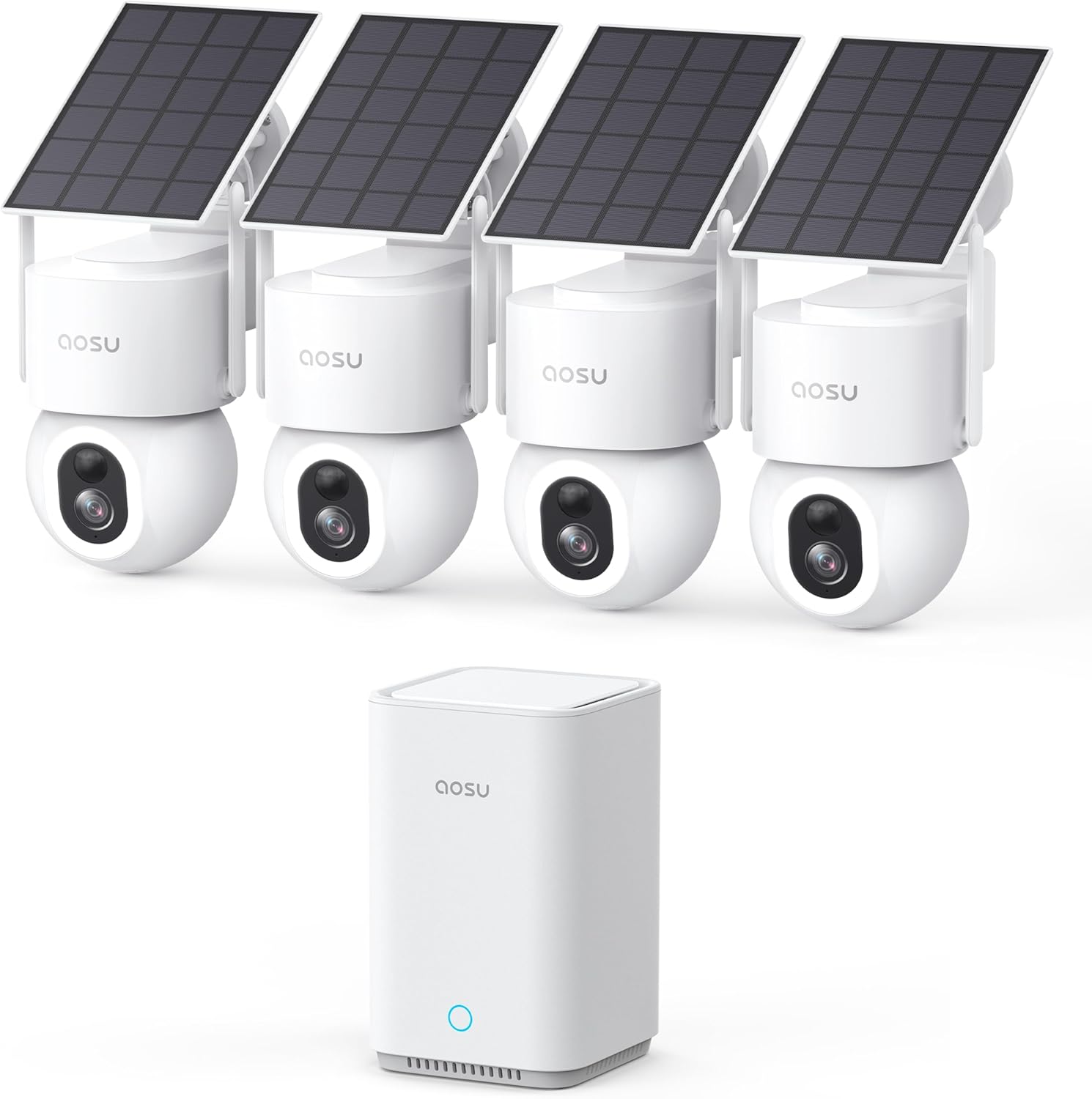
aosu SolarCam D1 Max 4-Cam Kit – Full In-Depth Review


The aosu SolarCam D1 Max 4-Cam Kit is a wireless outdoor security system designed for homeowners who want full-property coverage without paying monthly subscription fees. It combines solar-powered cameras, 360° pan-and-tilt coverage, AI motion tracking, color night vision, and local storage up to 1TB+ expansion, making it one of the more feature-rich budget-to-midrange security kits available today.

At its core, this system aims to remove the biggest frustrations in home security: wiring complexity, cloud subscriptions, and blind spots.


Design & Build Quality

Each camera in the kit is built for outdoor use with a weather-resistant housing designed to handle rain, dust, and temperature changes. The mounting system is fairly straightforward, and the included solar panel setup is one of the key advantages.

The design philosophy is practical rather than premium:

While the plastic construction isn’t luxury-grade, it feels durable enough for long-term outdoor installation in normal residential conditions.


Video Quality (Day & Night Performance)

The D1 Max delivers high-resolution video (up to 3K/5MP in many configurations), which is a noticeable upgrade over basic 1080p systems.

Daytime Performance

During the day, the system performs very well:

The pan-and-tilt functionality significantly reduces blind spots, especially in yards, driveways, and entry points.

Night Vision

The system uses color night vision with built-in spotlight assistance.

  • In low-light environments (porch lights, street lighting), footage remains in full color
  • In total darkness, it may switch to infrared-style monochrome
  • Spotlight illumination improves identification but can slightly give away camera position

Overall, night performance is strong for its price range, especially compared to older IR-only systems.


360° Coverage & Auto Tracking

One of the strongest features is the fully motorized 360° pan-and-tilt system.

This enables:

  • Complete horizontal coverage without repositioning the camera
  • Automatic tracking of movement across the frame
  • Zoom-follow behavior (depending on firmware version)

The auto-tracking works best for:

However, tracking can occasionally lag or lose fast-moving subjects, especially at the edges of the field of view.


AI Motion Detection

The system uses AI-based detection for:

This helps reduce false alerts from:

  • Wind-blown branches
  • Rain or insects
  • Lighting changes

In practice, detection is fairly accurate but not perfect. Occasional missed triggers or delayed notifications can occur depending on Wi-Fi strength and firmware behavior.


Solar Power System

The solar charging system is one of the biggest selling points.

Real-world performance:

  • With about 3 hours of direct sunlight per day, cameras can often stay powered continuously
  • Works well in sunny and moderate climates
  • May struggle in:
    • Winter conditions
    • Heavy shade installations
    • Extended cloudy weather

When solar input is insufficient, the internal battery carries the load, but users may eventually need manual charging via USB.

Bottom line:
Solar power is excellent for convenience, but not fully “set-and-forget” in low-sun environments.


Storage & No Subscription Model

One of the strongest advantages of the D1 Max system is its no-monthly-fee model.

Storage options include:

  • Local hub storage (commonly 32GB base)
  • Expandable storage support up to large capacities (up to 1TB+ depending on configuration and external drive support)

Benefits:

Limitations:

  • Storage fills over time with heavy motion activity
  • Older recordings are overwritten automatically
  • Exporting footage is not always as flexible as cloud systems

Still, for privacy-focused users, this is a major win.


App Experience & Smart Features

The mobile app includes:

  • Live camera viewing (multi-cam grid)
  • Playback of motion events
  • Zone customization (activity areas)
  • Alerts and notifications
  • Two-way audio communication

Pros:

Cons:

  • Notification delays can occur
  • Live view loading may lag on weaker networks
  • App polish is decent but not premium-tier

Installation & Setup

Installation is one of the system’s biggest strengths.

  • Fully wireless setup (no hard wiring required)
  • Mount cameras anywhere with sunlight access
  • App-guided pairing process
  • Hub-based connection simplifies network management

Most users can install the full 4-camera system in under an hour.

However, placement matters:

  • Cameras must remain within stable Wi-Fi range of the hub
  • Solar panel positioning is critical for reliability

Performance in Real Use

In everyday use, the system performs best as a deterrent + monitoring solution, not a forensic-grade surveillance system.

Strengths:

Weaknesses:


Pros and Cons Summary

Pros

  • True 360° pan-and-tilt coverage
  • No subscription fees
  • Solar-powered convenience
  • Color night vision with spotlight support
  • AI motion detection (people/vehicles/pets)
  • Local storage with high capacity potential
  • Easy installation

Cons

  • Solar charging depends heavily on sunlight conditions
  • Notification delays reported in some setups
  • Hub dependency creates single point of failure
  • App experience is good but not flawless
  • Storage can fill quickly with heavy activity

Final Verdict

The aosu SolarCam D1 Max 4-Cam Kit is best described as a high-value, subscription-free home security system with excellent coverage and strong core features, but with some tradeoffs in polish and long-term reliability.

It is ideal for:

  • Homeowners wanting full-yard coverage
  • Users who want to avoid monthly cloud fees
  • DIY installers
  • Basic-to-moderate security needs

It is not ideal for:


Overall Rating (Real-World Use)

8.5 / 10

A strong, modern wireless security system that delivers impressive features for the price, especially if you value local storage and subscription-free operation over perfect enterprise-level reliability.

See The Aosu Solarcam On Amazon!

Thursday, April 30, 2026

Kismile Mini Refrigerator Cooler 36L Beverage Fridge Review (1.3 Cu.Ft, 12 Bottle / 50 Can)


Introduction

The Kismile Mini Refrigerator Cooler 36L (1.3 cubic feet) is a compact beverage fridge designed for convenience, style, and everyday use. Built for environments like home bars, offices, dorm rooms, and bedrooms, it offers a dedicated space for keeping drinks chilled without taking up much room. With a stated capacity of around 12 bottles or 50 cans, it’s aimed at casual users who want easy access to cold beverages.

This review breaks down its design, performance, usability, and overall value to help you decide if it’s the right fit.


Design and Build Quality

One of the first things you notice about this fridge is its clean and modern appearance. The seamless outer frame gives it a polished look that blends well in most environments, from a minimalist office to a home entertainment setup.

The glass front door is both stylish and practical. It allows you to see your drinks at a glance without opening the door, which helps maintain internal temperature. The door seal is generally tight, which contributes to better cooling efficiency.

Its compact size is a major advantage. It can fit comfortably on a countertop, under a desk, or in tight corners, making it ideal for small spaces. Despite its size, it feels sturdy enough for everyday use.


Capacity and Storage Flexibility

With 36 liters of space, this fridge is designed for moderate beverage storage. It can typically hold:

  • Around 50 standard 12 oz cans
  • Or about 12 wine bottles

Actual capacity varies depending on the size and shape of your drinks. Mixing bottles and cans will reduce total storage, but adjustable wire shelves help improve flexibility. You can rearrange or remove shelves to fit taller items when needed.

This adaptability makes it more practical than many fixed-shelf mini fridges.


Cooling Performance

The Kismile beverage fridge uses a compressor-based cooling system, which is more effective than thermoelectric alternatives commonly found in small coolers. It typically operates within a temperature range of about 40°F to 61°F.

This makes it suitable for:

It’s important to set realistic expectations. This is not a full refrigerator, so it won’t reach the same low temperatures. If you prefer very cold drinks, it may not fully satisfy that preference.

The electronic temperature control is a nice feature, allowing for more precise adjustments than basic dial systems. However, like most compact fridges, it can experience slight fluctuations depending on room temperature and usage.


Noise Level

Noise is always a concern with mini fridges, especially in quiet environments. This unit is generally quiet during operation, with a low hum typical of compressor systems.

It’s not completely silent, though. You may hear occasional cycling sounds when the compressor turns on and off. For most users, this won’t be an issue, but in very quiet rooms, it may be noticeable.


Energy Efficiency

Due to its small size and focused function, this fridge is relatively energy-efficient. It doesn’t consume as much power as a full-size refrigerator, making it a practical choice for continuous use.

The internal LED light is another efficient feature. It provides good visibility without adding extra heat, which helps maintain stable internal temperatures.


Ease of Use

This fridge is designed to be simple and user-friendly. Setup is quick and straightforward:

The controls are easy to understand, and the adjustable shelves make organizing your drinks hassle-free. There are no complicated features or unnecessary extras, which makes it accessible for all users.


Pros

  • Compact and space-saving design
  • Modern look with glass door
  • Adjustable shelves for flexible storage
  • Quiet operation for most environments
  • Easy-to-use temperature controls
  • Good capacity for its size

Cons


Real-World Use

This fridge works best in situations where convenience matters more than maximum cooling power. It’s ideal for:

It’s not intended to replace your main refrigerator, but rather to complement it.


Final Verdict

The Kismile Mini Refrigerator Cooler 36L is a practical and stylish option for anyone looking for a compact beverage fridge. It delivers solid performance for its intended use, offering enough space for everyday drinks while maintaining a small footprint.

While it has some limitations—particularly in how cold it can get—it performs well within its category. For users who want a simple, reliable, and good-looking drink cooler, it’s a worthwhile choice.

See The Kismile Mini Fridge On Amazon!

Tuesday, March 31, 2026

Amazon Echo Show 15 Review: The Ultimate Smart Kitchen Hub for Modern Homes


The newest Amazon Echo Show 15 represents a major evolution in smart home displays, transforming what was once a simple voice assistant into a full-fledged household command center. Designed primarily for shared spaces like kitchens and living rooms, this device blends productivity, entertainment, and smart home control into a single, wall-mountable or stand-based unit. With its large Full HD screen, built-in Fire TV, and enhanced Alexa+ experience, it aims to become the digital heart of your home.

This in-depth review explores everything you need to know about the Echo Show 15, from design and features to real-world performance and overall value.

Design and Display

The first thing that stands out about the Echo Show 15 is its size. The 15.6-inch Full HD (1080p) display is significantly larger than most smart displays on the market, making it ideal for viewing from across the room.

The screen is bright, sharp, and well-suited for multiple purposes:

Its minimalist frame allows it to blend naturally into home décor, almost resembling a digital picture frame. It can be mounted on a wall in either portrait or landscape orientation, or placed on a stand for countertop use.

Performance and Alexa+ Integration

At its core, the Echo Show 15 is powered by Alexa, now enhanced with Alexa+ capabilities. This means more natural conversations, smarter responses, and better integration across services and smart home devices.

In everyday use, Alexa performs smoothly:

  • Quick responses to voice commands
  • Seamless smart home control
  • Reliable reminders and calendar management

The device also supports visual ID personalization, allowing it to recognize different family members and tailor content accordingly.

Home Organization Features

This is where the Echo Show 15 truly shines. It is designed as a shared family dashboard rather than a personal device.

Key organizational features include:

  • Customizable widgets for calendars, to-do lists, and notes
  • Sticky-note style reminders
  • Weather updates and daily briefings
  • Shared shopping lists

The large display makes it easy for everyone in the household to stay on the same page. It essentially replaces whiteboards, paper planners, and fridge notes with a digital alternative that updates in real time.

Built-in Fire TV Experience

One of the biggest upgrades in the newest model is the integration of Fire TV directly into the device.

This turns the Echo Show 15 into a fully functional entertainment hub:

The experience feels closer to a small wall-mounted TV than a typical smart display. This is especially useful in kitchens, where you can watch shows while cooking or cleaning.

Audio and Video Improvements

Amazon significantly improved the audio performance in the latest version. The Echo Show 15 now delivers:

While it won’t replace a dedicated home theater system, it is more than adequate for casual listening and TV viewing.

The upgraded camera also deserves attention:

This makes video calls feel more natural, especially when moving around the room.

Smart Home Control

The Echo Show 15 functions as a central hub for smart home devices. From the screen, users can:

The interface is intuitive, combining touch controls with voice commands for flexibility.

Everyday Use Experience

In real-world use, the Echo Show 15 excels as a shared household device rather than a personal assistant.

It works best when:

Its ability to display useful information at a glance while also serving as an entertainment system makes it incredibly versatile.

However, it does require some initial setup and customization to get the most out of its widget system and features.

Pros and Cons

Pros

  • Large, vibrant 15.6-inch Full HD display
  • Excellent home organization features
  • Built-in Fire TV adds real entertainment value
  • Improved audio quality over previous versions
  • Strong smart home integration
  • Personalized user experience with visual ID

Cons

Final Verdict

The Amazon Echo Show 15 (newest model) is not just another smart display—it is a complete home hub designed for modern, connected households. It successfully combines organization, entertainment, and smart home control into one cohesive device.

For families or anyone looking to centralize their home management and media experience, it offers tremendous value. Its large screen and Fire TV integration set it apart from smaller Echo devices, making it feel more like a hybrid between a smart assistant and a wall-mounted TV.

If you want a device that keeps your household organized while doubling as an entertainment center, the Echo Show 15 is one of the most compelling options currently available.

See The Echo Show 15 On Amazon!

Thursday, February 26, 2026

Roku Streaming Stick HD Review — Full In-Depth Look at the HD Streaming Device for TV with Roku Voice Remote, Free & Live TV


The Roku Streaming Stick HD is one of Roku’s most popular and affordable streaming media players. It’s designed to bring a wide range of streaming services and live TV options to virtually any television with an HDMI port. In this review, we’ll look at the design, setup, user experience, performance, content options, remote features, pros and cons, and whether it’s worth buying.

Design and What’s Included

The Roku Streaming Stick HD is a compact device roughly the size of a large USB flash drive. You plug it directly into your TV’s HDMI port, and it draws power from either a USB port on the TV or a wall adapter through a USB cable. Because it’s so small, it stays hidden behind the TV once installed, making for a clean and unobtrusive setup.

In the box you’ll typically find:
• The Roku Streaming Stick HD dongle
• Roku Voice Remote (simple, button-based remote with voice control built in)
USB power cable
• Power adapter
• Two AAA batteries for the remote
• Quick start guide

Setup and Ease of Use

Getting started with the Roku Streaming Stick HD is straightforward. You plug the stick into your TV’s HDMI port, connect the power cable, select the Roku input on your TV, and follow the on-screen prompts. You’ll need to connect to your home Wi-Fi network and either log in or create a Roku account.

Roku’s setup process is known for being user-friendly, with clear instructions and minimal steps. The device updates itself automatically during setup, so you always start with the latest software version.

User Interface and Navigation

Once setup is complete, the Roku home screen greets you with a simple, tile-based interface. Ribboned rows help you find apps (called channels), settings, and featured content. Everything is very responsive with minimal lag.

The Roku interface is intentionally minimalistic. It’s designed to make it easy for anyone to find streaming channels, search for shows or movies, and manage settings without confusion. The home screen can be customized, letting you rearrange channels in the order you like.

Streaming Performance and Video Quality

The Roku Streaming Stick HD supports up to 1080p resolution, which means full high-definition video but not 4K. For many people, 1080p is more than sufficient for smaller or older HDTVs, and the device still delivers crisp, smooth video.

Performance with streaming apps such as Netflix, Hulu, Disney+, Peacock, and more is solid. Apps load quickly, and video playback is steady as long as your internet connection is stable. You won’t get the ultra-HD detail of 4K devices, but for everyday viewing of TV shows, movies, and live content, the quality is excellent.

The device also handles free and ad-supported channels well. Roku’s own free “The Roku Channel” offers a range of movies and TV shows, and many live news and entertainment streams are available without a subscription.

Content and Channels

One of Roku’s greatest strengths is its app library. The Roku Channel Store has thousands of channels covering:
• All major subscription services (Netflix, Prime Video, Hulu, Disney+, HBO Max)
Free ad-supported services (Pluto TV, Tubi, Crackle, The Roku Channel)
• Live TV options including local news, sports, and specialty streams
• Niche and international content

Because Roku partners with so many services, you likely won’t miss out on anything you want to watch, even without paying for many subscription channels.

Voice Remote Features

The included Roku Voice Remote adds a layer of convenience. It has traditional buttons for navigation, volume, and power, but also includes a microphone button. Hold it and speak commands like “search for action movies,” “play The Office,” or “launch YouTube.” Voice search covers a broad range of channels and can save time compared to typing with on-screen keyboards.

The remote has good range and doesn’t require line of sight thanks to wireless connectivity, making it easy to control the Roku from across the room.

Mobile App Integration

Roku also offers a companion mobile app that mirrors many on-TV features:
• Remote control with keyboard input
Private listening through headphones
• Search and launch apps from your phone
• Browse content and cast media

This is especially useful if you misplace the physical remote or want a more tactile typing experience.

Pros and Cons

Pros
• Extremely affordable streaming solution
• Simple setup and intuitive interface
Access to thousands of streaming channels
• Voice remote enhances search and control
• Great performance for 1080p content
• Good selection of free and live TV options

Cons
• No 4K or HDR support (only up to 1080p)
Limited internal storage for apps (common on stick devices)
• No Ethernet port (Wi-Fi only unless you use adapters)

Who Is This Best For?

The Roku Streaming Stick HD is perfect for people who want to convert a regular HDTV into a smart TV without paying for a more expensive 4K device. It is ideal for:
• Secondary TVs in bedrooms or kitchens
• Users who mostly watch 1080p content
• People who want simplicity and ease of use
• Viewers who like free or ad-supported streaming without subscriptions

If you have a 4K TV and want the highest possible picture quality, a 4K-capable Roku device might be a better fit. But for most everyday viewers, the Streaming Stick HD brings excellent value and performance.

Final Verdict

The Roku Streaming Stick HD delivers a reliable and user-friendly streaming experience at a very attractive price. It doesn’t chase every high-end feature, but it doesn’t need to. What it does — making streaming accessible, fast, and flexible — it does very well. If you’re looking to upgrade your TV viewing with thousands of apps, voice search, and free content options, this Roku stick is a top choice in its class.

Get The Roku Streaming Stick HD On Amazon!

Friday, January 30, 2026

Hatch Restore 3 Sunrise Alarm Clock, Sound Machine, Smart Light Full In-Depth Review


Introduction

The Hatch Restore 3 is a premium bedside device designed to improve both how you fall asleep and how you wake up. It combines a sunrise alarm clock, sound machine, and smart light into a single, screen-free system that focuses on building healthier sleep routines. Rather than jolting you awake with harsh alarms or encouraging late-night phone use, the Restore 3 aims to support natural circadian rhythms through light and sound. This version, finished in a warm cocoa color, targets users who want a calm, modern sleep solution rather than a traditional alarm clock.

Design and Build Quality

The Hatch Restore 3 has a clean, minimalist design with soft curves that make it look more like a decor piece than a gadget. The cocoa finish gives it a warm, neutral appearance that fits well in most bedrooms without drawing attention. It feels solid and well-built, with no cheap or flimsy parts.

One of the strongest design choices is the inclusion of physical buttons on the device itself. These allow you to start your bedtime routine, snooze or stop alarms, adjust volume, and control lighting without picking up your phone. This reinforces the idea of a screen-free sleep environment and makes the Restore 3 practical for use in the dark.

Sunrise Alarm and Light Performance

The sunrise alarm is the core feature of the Hatch Restore 3. Instead of a sudden alarm sound, the light gradually brightens over a customizable period of time. It starts with deep red tones and slowly transitions through warmer colors into brighter light, mimicking a natural sunrise.

This gradual increase in light helps signal your body that it’s time to wake up, often reducing grogginess and stress in the morning. Many users find themselves waking naturally before the sound alarm even begins. This feature is especially beneficial during darker months or for people who struggle with abrupt wake-ups.

At night, the Restore 3 also offers a sunset or wind-down light mode. The light slowly dims as bedtime approaches, helping your brain associate the environment with sleep rather than stimulation.

Sound Machine and Audio Quality

The Restore 3 functions as a full-featured sound machine with a wide selection of calming audio options. These include various types of white noise, ambient sounds, and nature-inspired soundscapes designed to promote relaxation and mask background noise.

The built-in speaker delivers clear, evenly balanced sound that works well for overnight use. Audio fades in and out smoothly, avoiding abrupt changes that could disrupt sleep. Even without optional upgrades, the available sounds cover most common sleep needs such as steady noise, soft rainfall, and gentle background tones.

For people who rely on sound to fall asleep or stay asleep, this feature alone can replace a separate white noise machine.

Sleep and Wake Routines

One of the biggest strengths of the Hatch Restore 3 is its ability to combine light and sound into structured routines. You can create a nightly routine that begins with a wind-down phase, continues with sleep sounds throughout the night, and ends with a sunrise wake-up sequence in the morning.

This routine-based approach helps reinforce consistent sleep habits. Over time, your body begins to associate the lighting and sounds with rest, making it easier to fall asleep without relying on screens or distractions.

The routines are flexible and can be adjusted to match different schedules, making the Restore 3 useful for both early risers and night owls.

Ease of Use and Daily Experience

Initial setup is handled through a smartphone app, where routines, alarms, light colors, brightness levels, and sound selections are configured. Once setup is complete, daily use can mostly be handled directly on the device using the physical buttons.

In day-to-day use, the Restore 3 feels calm and intuitive. It does not display notifications, messages, or time in an attention-grabbing way, which helps keep the bedroom focused on rest rather than stimulation.

That said, the device does rely on a stable internet connection for full functionality. If connectivity is unreliable, setup and certain features can be frustrating. This is one of the few areas where the Restore 3 may feel less dependable than a basic alarm clock.

Performance for Sleep Improvement

For many users, the Hatch Restore 3 genuinely improves sleep quality and morning mood. Falling asleep feels more intentional, and waking up feels less stressful. The gradual light transitions reduce the shock of waking up, and the sound machine helps create a consistent sleep environment.

However, very heavy sleepers may find the gentle alarm insufficient on its own and may need to pair it with louder sounds or a backup alarm. The Restore 3 is designed for calm and gradual waking, not for extreme alarm intensity.

Pros

The sunrise alarm provides a natural, gentle wake-up experience
Combines alarm clock, sound machine, and smart light in one device
Physical buttons allow screen-free control at night
Supports structured bedtime and morning routines
Modern design blends well with bedroom decor

Cons

Requires app setup and internet connection
Some features are limited without optional upgrades
Gentle alarms may not suit extremely heavy sleepers
Higher price compared to basic alarm clocks or sound machines

Overall Value and Final Thoughts

The Hatch Restore 3 is best viewed as a sleep wellness device rather than a simple alarm clock. Its strength lies in helping users build consistent, calming routines that support better rest and easier mornings. The combination of sunrise lighting, soothing audio, and intentional design makes it especially appealing to people who want to reduce screen use at night and wake up feeling less rushed.

While the price and connectivity requirements may be drawbacks for some, those who value sleep quality and routine-based living will likely find the Hatch Restore 3 to be a worthwhile investment. If you want a bedside device that focuses on improving how you sleep rather than just telling you the time, the Hatch Restore 3 delivers a polished and thoughtfully designed experience.

See The Hatch Restore 3 On Amazon!

Tuesday, December 30, 2025

In-Depth Review: Dell 16 Touchscreen Laptop Computer DC16250


The Dell 16 Touchscreen Laptop Computer DC16250 is designed for users who demand strong performance, expansive storage, and a large, comfortable display for serious productivity. With a modern Intel processor, an unusually high amount of memory and storage, and Windows 11 Pro, this laptop targets professionals, power users, and anyone who wants a system that can handle heavy workloads without compromise.

Design and Build Quality

The DC16250 features a clean, understated design that fits well in both professional and home environments. The 16-inch form factor gives it a solid presence, but the overall build remains manageable for daily transport. The chassis feels sturdy and well assembled, offering confidence for long-term use. Dell’s design approach here focuses on practicality rather than flash, resulting in a laptop that looks professional and purposeful.

The hinge feels strong, the display opens smoothly, and the overall construction suggests durability for everyday use. For a laptop with such powerful internal components, the design remains relatively slim and refined.

Display Quality

The 16-inch 16:10 FHD+ touchscreen is one of the highlights of this system. The taller aspect ratio provides more vertical space, which is especially helpful for documents, spreadsheets, coding, and web browsing. The resolution delivers sharp text and clear images, making it comfortable for long work sessions.

Touch responsiveness is smooth and accurate, adding flexibility for navigation, presentations, or creative tasks. With 300 nits of brightness, the display performs well indoors and in most lighting conditions, though very bright outdoor environments may require higher brightness settings. Viewing angles are wide, and colors appear balanced and natural for everyday use.

Performance and Processing Power

At the heart of the DC16250 is an Intel 10-Core Core 7 150U processor with boost speeds up to 5.4 GHz. This processor delivers strong performance for productivity tasks, multitasking, and demanding workloads. Paired with an impressive 64 GB of DDR5 RAM, the system handles multiple applications, browser tabs, and background processes effortlessly.

Everyday tasks feel fast and responsive, and heavier workloads such as data analysis, large spreadsheets, software development, or running virtual machines are well within this laptop’s capabilities. The system remains smooth even under pressure, making it a reliable choice for advanced users.

Storage and Memory

One of the most striking features of this laptop is its massive 4 TB SSD. This amount of storage is ideal for users who work with large media libraries, extensive project files, or complex software environments. Boot times are quick, applications load rapidly, and file transfers feel nearly instantaneous.

The combination of 64 GB of DDR5 memory and a high-capacity SSD ensures this laptop is well prepared for future software demands. Users are unlikely to outgrow these specifications anytime soon, making the DC16250 a strong long-term investment.

Keyboard, Touchpad, and Input

The backlit keyboard offers a comfortable typing experience with good spacing and consistent key feedback. It is well suited for long typing sessions, whether writing, coding, or handling emails throughout the day. The backlighting is evenly distributed and helpful in low-light environments.

The touchpad is large and responsive, supporting smooth gesture controls. The touchscreen adds an extra layer of convenience, allowing users to interact directly with content when needed. The inclusion of Copilot AI integration enhances productivity by providing quick access to AI-powered tools within Windows 11.

Connectivity and Features

The DC16250 includes a solid selection of ports to support modern workflows. USB-C and USB-A ports allow for flexible peripheral connections, while HDMI support makes it easy to connect external displays. Wi-Fi 6 ensures fast and stable wireless performance on compatible networks.

Windows 11 Pro comes preinstalled, offering advanced security features, better system management options, and tools aimed at business and professional users. These features make the laptop especially appealing for work environments that require reliability and control.

Battery Life and Thermal Performance

Battery life is respectable for a 16-inch laptop with high-end specifications. It can handle a full workday of moderate use, such as document editing, browsing, and meetings. More demanding tasks will naturally reduce battery life, which is expected for a system of this power level.

Under heavy workloads, the cooling system does its job, though fans may become audible. This is typical for performance-focused laptops and does not detract significantly from everyday use.

Real-World Experience

In real-world scenarios, the Dell DC16250 excels at multitasking and sustained productivity. It is well suited for professionals who need to run multiple demanding applications simultaneously without slowdowns. Tasks such as software development, large-scale data work, content creation, and business operations feel smooth and efficient.

While integrated graphics limit its suitability for high-end gaming or intensive 3D rendering, the system performs well for general creative tasks, media consumption, and office productivity.

Pros

Exceptional multitasking performance with 64 GB of DDR5 RAM
Massive 4 TB SSD for extensive storage needs
Large 16-inch 16:10 touchscreen enhances productivity
Fast and responsive Intel Core 7 processor
Windows 11 Pro and Copilot AI integration

Cons

Integrated graphics are not ideal for heavy gaming or advanced 3D work
Battery life is good but not class-leading for its size
Fan noise can be noticeable under sustained heavy loads

Who This Laptop Is Best For

The Dell 16 Touchscreen Laptop Computer DC16250 is ideal for professionals, power users, and advanced multitaskers who prioritize performance, storage, and screen space. It is especially well suited for business users, developers, analysts, and creators who need a dependable system capable of handling demanding workloads over the long term.

Summary

The Dell DC16250 stands out as a powerful, future-ready laptop with exceptional memory and storage capacity. Its large touchscreen display, strong processing performance, and professional-grade features make it a compelling choice for users who need a serious productivity machine. While it may not be aimed at gamers or graphics-intensive professionals, it excels as a high-performance Windows laptop built for work, efficiency, and long-term reliability.

See The Dell DC16250 On Amazon!

Friday, November 14, 2025

In-Depth Review of the Bose SoundLink Flex Bluetooth Speaker (2nd Gen)


The Bose SoundLink Flex Bluetooth Speaker (2nd Gen) continues the company’s long-standing reputation for delivering powerful audio in compact, durable designs. This second-generation model refines the original SoundLink Flex with improved sound processing, stronger Bluetooth performance, and the same rugged build that made the first release so appealing. It is designed for listeners who want premium audio on the go, whether at home, outdoors, or in more demanding environments.

Design and Build Quality

The SoundLink Flex maintains the sleek, modern look Bose is known for but reinforces its durability for real-world use. It has a clean, minimalist form with softly rounded edges and a rubberized exterior that adds protection without being bulky. The speaker is fully waterproof and dustproof with a rating suitable for beach trips, poolside use, camping, hiking, or everyday listening. It can handle splashes, dirt, and brief submersion, making it one of the most reliable portable speakers in its size class. The USB-C charging port is safely sealed, and the speaker comes with a built-in utility loop for attaching it to bags, hooks, or outdoor gear.

Sound Quality and Performance

One of the biggest strengths of the SoundLink Flex is its sound profile. Bose uses proprietary audio technologies to deliver rich, detailed, and surprisingly powerful sound for such a compact speaker. The clarity of vocals is excellent, and the midrange has strong definition. Bass response is full and rounded without overwhelming the overall mix. Even at higher volumes, the audio remains clean and distortion-free, which is a challenge for many small speakers.

The updated version includes improved digital signal processing and more efficient drivers, giving it better depth and soundstage compared to the previous model. Whether playing acoustic music, podcasts, or bass-heavy tracks, the speaker performs consistently well. Bose’s PositionIQ feature remains a standout, automatically adjusting the sound depending on whether the speaker is upright, hanging, or lying flat. This allows the SoundLink Flex to deliver optimal audio regardless of how or where it is placed.

Battery Life and Charging

Battery life is rated for up to 12 hours, making it more than capable of lasting through long listening sessions, hikes, or outdoor gatherings. Actual performance varies depending on volume levels, but most users can expect close to the full rating under typical use. The inclusion of USB-C charging is convenient and modern, allowing for quick and reliable charging. It is a welcome improvement over older models that relied on outdated ports.

Bluetooth Connectivity and Features

Bluetooth performance on the SoundLink Flex has been strengthened, offering more stable connections and quicker pairing. The speaker connects smoothly to smartphones, tablets, and other Bluetooth-enabled devices, and Bose’s mobile app enhances functionality with firmware updates and customizable settings. Multipoint pairing is supported, allowing users to switch between devices with ease.

Another convenience is the built-in microphone that enables voice assistant access and hands-free calls. Call quality is clear, making the speaker useful for both entertainment and everyday communication.

Durability and Outdoor Use

This model is clearly built with active lifestyles in mind. Its waterproof and dustproof construction means it can withstand harsh environments that would damage lesser speakers. The rugged exterior resists scratches, dents, and drops, making it suitable for camping trips, beach outings, and backyard use. It is also buoyant enough to handle accidental drops into water without worry.

Portability

Weighing lightly and sized for easy carrying, the SoundLink Flex (2nd Gen) is highly portable. The integrated loop allows for quick attachment to backpacks, tents, bikes, or kayaks. Its small footprint makes it equally useful indoors, fitting easily onto desks, shelves, or kitchen counters without taking up much space.

Pros

Excellent sound quality with rich bass and clear vocals
Durable waterproof and dustproof design
Automatic sound adjustment with PositionIQ
Strong Bluetooth connectivity and multipoint support
Portable and lightweight with a built-in utility loop
USB-C charging and solid 12-hour battery life

Cons

No 360-degree sound like some competing models
Battery life is good but not exceptional compared with larger speakers
The Bose app features are useful but somewhat limited

Final Verdict

The Bose SoundLink Flex Bluetooth Speaker (2nd Gen) is an impressive blend of rugged durability, refined design, and top-tier sound performance. It offers clear, powerful audio in a compact package that is just as comfortable indoors as it is outdoors. Its waterproof construction, reliable battery life, and smart PositionIQ technology make it one of the most well-rounded portable speakers on the market today.

For listeners seeking a dependable, high-quality Bluetooth speaker that can travel anywhere and handle the elements, the SoundLink Flex is a standout choice. It delivers excellent value for those who prioritize audio performance and durability in a compact form.

🕪Get The Boise SoundLink Flex On Amazon!🔊

Friday, October 10, 2025

Meta Quest 3S 256GB — Full Review


Introduction
The Meta Quest 3S 256GB arrives as Meta’s more affordable, mass-market spin on mixed-reality headsets: a compact, standalone device that promises many of the features of the higher-end Quest 3 while trimming cost through a few deliberate compromises. The model includes Batman: Arkham Shadow and a three-month trial of Meta Horizon+, which provides access to over 30 games. This bundle makes it one of the most appealing packages for newcomers to VR or those upgrading from an older Quest.

Design and Comfort
The Meta Quest 3S looks like a slimmed-down version of its flagship counterpart, designed for comfort and accessibility. The shell is lightweight, and the head strap distributes weight fairly evenly across the face and head. The foam facial interface is soft and breathable, offering a decent seal that blocks external light without causing discomfort. During short to medium-length sessions, the headset feels well-balanced, though extended gameplay sessions may cause some forehead or cheek pressure. Users who wear glasses can use the included spacer, but third-party facial interfaces can improve the fit for extended play.

Display and Optics
The headset delivers crisp, bright visuals through its high-resolution display, offering solid color reproduction and clear text readability. While not quite as sharp as the premium pancake lenses found on the Quest 3, the display remains impressive for its price range. Visual clarity is strong across most of the field of view, with only minor distortion at the edges. The passthrough mixed-reality feature provides a full-color view of the user’s surroundings, allowing seamless blending between real-world and virtual elements. This makes the 3S suitable for AR-style games and mixed-reality applications without requiring external sensors.

Performance and Hardware
Powered by Meta’s advanced XR chipset, the Quest 3S offers smooth gameplay and responsive tracking across most modern VR titles. Performance is steady, and the 256GB storage option ensures there’s ample room for large games and media. Even graphically demanding titles such as Batman: Arkham Shadow run fluidly, thanks to good optimization and Meta’s ongoing firmware support. The headset also boots up quickly and transitions between apps with minimal lag.

Controllers and Tracking
The Quest 3S comes with Meta’s Touch Plus controllers, which maintain the same ergonomic design that players have come to expect. They feel natural in hand and include solid haptic feedback for immersive gameplay. Tracking accuracy is impressive for a headset in this price range, with consistent performance even in moderately lit environments. Hand tracking is also supported, allowing you to navigate menus and interact with apps without controllers, though it’s still best used for lighter experiences.

Battery Life and Charging
Battery life averages around two to three hours, depending on the game and whether mixed-reality features are used. This is standard for standalone VR headsets. Charging is handled through a USB-C cable, and a full charge typically takes around two hours. For players who enjoy longer sessions, optional accessories such as head straps with built-in batteries can extend playtime considerably.

Game Library and Bundled Content
The 3S bundle is particularly appealing because it includes Batman: Arkham Shadow, one of the standout VR titles available. The game showcases what the hardware can achieve, with cinematic storytelling, intuitive combat, and deep immersion that demonstrates the headset’s capabilities. Beyond that, the inclusion of a Meta Horizon+ trial offers instant access to more than 30 games, ranging from fitness apps to social experiences and action titles. This selection gives new users a broad taste of what VR has to offer without additional purchases.

Software Ecosystem
The Meta Quest platform remains one of the most mature VR ecosystems available. The headset supports thousands of applications through the Meta store, with new titles and updates arriving regularly. Social hubs like Horizon Worlds allow users to explore, meet friends, and participate in community events. Meta continues to enhance features like passthrough quality, hand tracking, and multitasking, ensuring the 3S stays relevant for years.

Practical Use and Experience
Setup is straightforward, taking only a few minutes with the Meta smartphone app. Guardian boundaries are easily drawn, and the system reliably tracks your movements within those limits. Audio is delivered through integrated speakers that provide decent spatial sound, though connecting Bluetooth or wired headphones can improve the experience. The headset runs quietly, with minimal heat buildup during normal use.

Value and Target Audience
The Meta Quest 3S 256GB bundle offers one of the best value propositions in standalone VR. It’s ideal for those new to virtual reality, families looking for a shared entertainment device, or users upgrading from an older Quest model. Its balance of price, performance, and included content makes it a strong choice for anyone seeking an all-in-one VR solution without needing a gaming PC.

Drawbacks
While the Quest 3S delivers excellent value, it does have limitations. Visual clarity, while good, doesn’t quite match the premium pancake lenses of higher-end models. Battery life remains short for long gaming sessions, and the built-in head strap could be more comfortable for extended use. Advanced users seeking the highest fidelity visuals or longer play sessions might consider the Quest 3 or PC-tethered alternatives.

Final Verdict
The Meta Quest 3S 256GB bundle, complete with Batman: Arkham Shadow and a Meta Horizon+ trial, strikes a great balance between accessibility and performance. It’s a highly capable mixed-reality headset that delivers an impressive standalone experience. The generous storage capacity, solid hardware performance, and rich game library make it one of the strongest VR packages available today.

Pros

  • 256GB of storage offers plenty of space for large games and apps

  • Batman: Arkham Shadow and Horizon+ trial add excellent value

  • Good display quality and smooth performance

  • Strong software ecosystem with wide game support

Cons

Overall, the Meta Quest 3S 256GB is a top-tier option for newcomers and casual VR enthusiasts who want a powerful, standalone device with plenty of content included. It proves that immersive virtual reality doesn’t have to be complicated or expensive.

🥽See Meta Quest 3S On Amazon!🥽

aosu SolarCam D1 Max 4-Cam Kit – Full In-Depth Review

  The aosu SolarCam D1 Max 4-Cam Kit is a wireless outdoor security system designed for homeowners who want full-property coverage withou...