Showing posts with label cam. Show all posts

Saturday, May 30, 2026

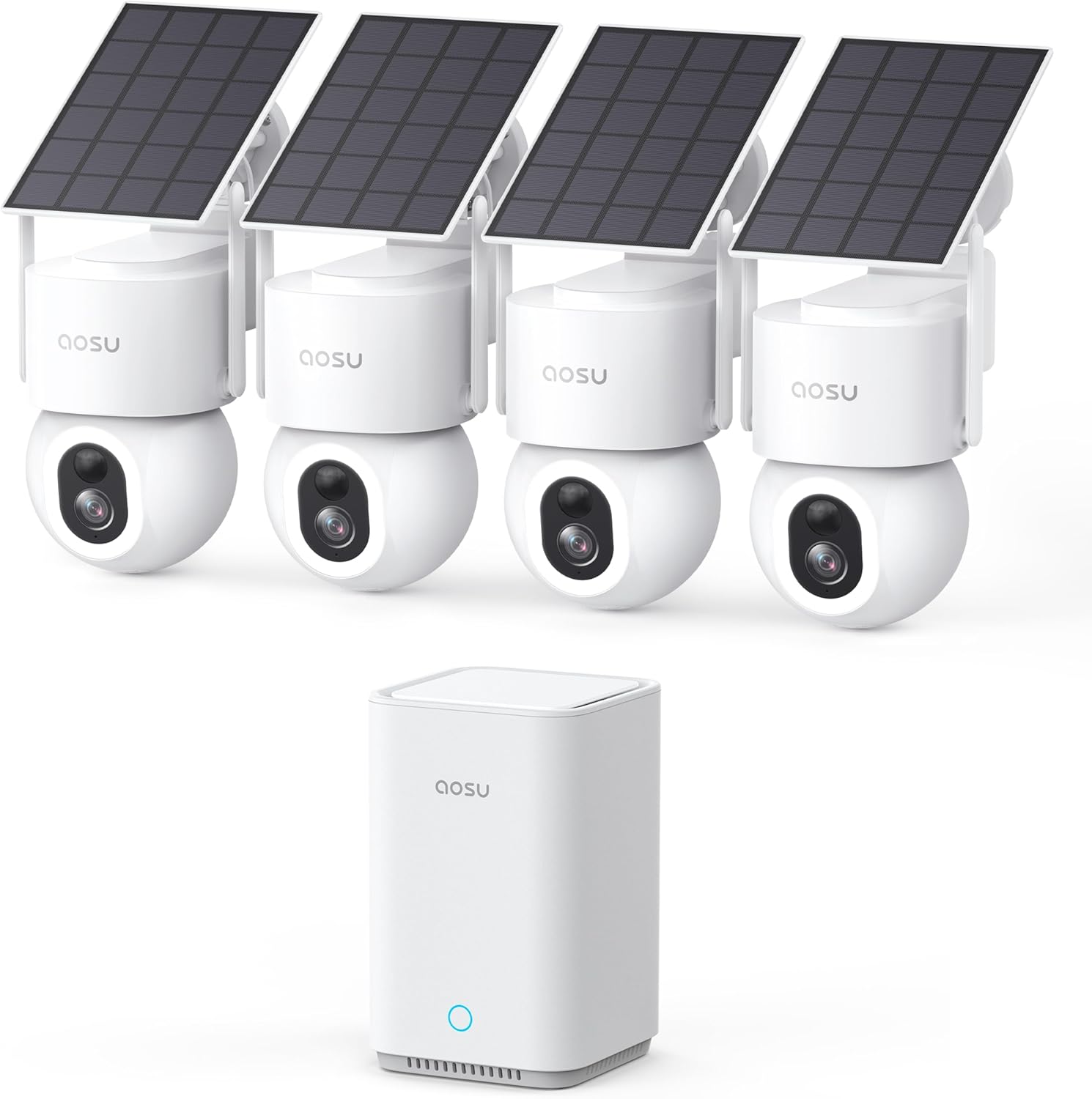
aosu SolarCam D1 Max 4-Cam Kit – Full In-Depth Review


The aosu SolarCam D1 Max 4-Cam Kit is a wireless outdoor security system designed for homeowners who want full-property coverage without paying monthly subscription fees. It combines solar-powered cameras, 360° pan-and-tilt coverage, AI motion tracking, color night vision, and local storage up to 1TB+ expansion, making it one of the more feature-rich budget-to-midrange security kits available today.

At its core, this system aims to remove the biggest frustrations in home security: wiring complexity, cloud subscriptions, and blind spots.


Design & Build Quality

Each camera in the kit is built for outdoor use with a weather-resistant housing designed to handle rain, dust, and temperature changes. The mounting system is fairly straightforward, and the included solar panel setup is one of the key advantages.

The design philosophy is practical rather than premium:

While the plastic construction isn’t luxury-grade, it feels durable enough for long-term outdoor installation in normal residential conditions.


Video Quality (Day & Night Performance)

The D1 Max delivers high-resolution video (up to 3K/5MP in many configurations), which is a noticeable upgrade over basic 1080p systems.

Daytime Performance

During the day, the system performs very well:

The pan-and-tilt functionality significantly reduces blind spots, especially in yards, driveways, and entry points.

Night Vision

The system uses color night vision with built-in spotlight assistance.

  • In low-light environments (porch lights, street lighting), footage remains in full color
  • In total darkness, it may switch to infrared-style monochrome
  • Spotlight illumination improves identification but can slightly give away camera position

Overall, night performance is strong for its price range, especially compared to older IR-only systems.


360° Coverage & Auto Tracking

One of the strongest features is the fully motorized 360° pan-and-tilt system.

This enables:

  • Complete horizontal coverage without repositioning the camera
  • Automatic tracking of movement across the frame
  • Zoom-follow behavior (depending on firmware version)

The auto-tracking works best for:

However, tracking can occasionally lag or lose fast-moving subjects, especially at the edges of the field of view.


AI Motion Detection

The system uses AI-based detection for:

This helps reduce false alerts from:

  • Wind-blown branches
  • Rain or insects
  • Lighting changes

In practice, detection is fairly accurate but not perfect. Occasional missed triggers or delayed notifications can occur depending on Wi-Fi strength and firmware behavior.


Solar Power System

The solar charging system is one of the biggest selling points.

Real-world performance:

  • With about 3 hours of direct sunlight per day, cameras can often stay powered continuously
  • Works well in sunny and moderate climates
  • May struggle in:
    • Winter conditions
    • Heavy shade installations
    • Extended cloudy weather

When solar input is insufficient, the internal battery carries the load, but users may eventually need manual charging via USB.

Bottom line:
Solar power is excellent for convenience, but not fully “set-and-forget” in low-sun environments.


Storage & No Subscription Model

One of the strongest advantages of the D1 Max system is its no-monthly-fee model.

Storage options include:

  • Local hub storage (commonly 32GB base)
  • Expandable storage support up to large capacities (up to 1TB+ depending on configuration and external drive support)

Benefits:

Limitations:

  • Storage fills over time with heavy motion activity
  • Older recordings are overwritten automatically
  • Exporting footage is not always as flexible as cloud systems

Still, for privacy-focused users, this is a major win.


App Experience & Smart Features

The mobile app includes:

  • Live camera viewing (multi-cam grid)
  • Playback of motion events
  • Zone customization (activity areas)
  • Alerts and notifications
  • Two-way audio communication

Pros:

Cons:

  • Notification delays can occur
  • Live view loading may lag on weaker networks
  • App polish is decent but not premium-tier

Installation & Setup

Installation is one of the system’s biggest strengths.

  • Fully wireless setup (no hard wiring required)
  • Mount cameras anywhere with sunlight access
  • App-guided pairing process
  • Hub-based connection simplifies network management

Most users can install the full 4-camera system in under an hour.

However, placement matters:

  • Cameras must remain within stable Wi-Fi range of the hub
  • Solar panel positioning is critical for reliability

Performance in Real Use

In everyday use, the system performs best as a deterrent + monitoring solution, not a forensic-grade surveillance system.

Strengths:

Weaknesses:


Pros and Cons Summary

Pros

  • True 360° pan-and-tilt coverage
  • No subscription fees
  • Solar-powered convenience
  • Color night vision with spotlight support
  • AI motion detection (people/vehicles/pets)
  • Local storage with high capacity potential
  • Easy installation

Cons

  • Solar charging depends heavily on sunlight conditions
  • Notification delays reported in some setups
  • Hub dependency creates single point of failure
  • App experience is good but not flawless
  • Storage can fill quickly with heavy activity

Final Verdict

The aosu SolarCam D1 Max 4-Cam Kit is best described as a high-value, subscription-free home security system with excellent coverage and strong core features, but with some tradeoffs in polish and long-term reliability.

It is ideal for:

  • Homeowners wanting full-yard coverage
  • Users who want to avoid monthly cloud fees
  • DIY installers
  • Basic-to-moderate security needs

It is not ideal for:


Overall Rating (Real-World Use)

8.5 / 10

A strong, modern wireless security system that delivers impressive features for the price, especially if you value local storage and subscription-free operation over perfect enterprise-level reliability.

See The Aosu Solarcam On Amazon!

Thursday, October 10, 2024

Upgrade Digital Camera for Kids: An In-Depth Look


In today’s digital age, introducing children to photography can be a wonderful way to foster creativity and capture memories. The Upgrade Digital Camera, featuring a robust 50MP sensor and Full HD 1080P video capabilities, is designed specifically for kids. This compact and user-friendly camera not only encourages exploration but also integrates advanced features that make it suitable for both beginners and more experienced young photographers.

Key Features

1. High-Resolution Photography

The Upgrade Digital Camera boasts an impressive 50MP resolution. This level of detail allows kids to take vibrant, high-quality photos that can be printed or shared digitally without losing clarity. The camera's ability to capture fine details makes it suitable for various photography styles, from landscapes to portraits.

2. Full HD 1080P Video Recording

In addition to still photography, this camera supports Full HD 1080P video recording. Kids can document their adventures in motion, creating videos that can be shared with family and friends. The video quality enhances the storytelling aspect of their experiences, making it a fantastic tool for creative expression.

3. 16x Zoom Capability

Equipped with 16x optical zoom, the camera allows kids to capture distant subjects without sacrificing image quality. This feature is particularly beneficial for wildlife photography, sports events, or any scenario where the subject is far away. The zoom function encourages kids to explore different perspectives and compositions.

4. Anti-Shake Technology

One of the common challenges young photographers face is camera shake, which can result in blurry images. The Upgrade Digital Camera includes anti-shake technology, ensuring that photos and videos remain stable even if the user is moving. This feature significantly enhances the overall user experience, allowing kids to focus on creativity rather than technical difficulties.

5. Compact and Lightweight Design

Designed with children in mind, this camera is compact and lightweight, making it easy for small hands to hold and operate. Its ergonomic design ensures comfort during prolonged use, encouraging kids to explore photography without feeling fatigued.

Additional Features

1. User-Friendly Interface

The camera is built with a simple, intuitive interface, allowing kids to navigate its functions easily. Large buttons and a straightforward menu make it accessible for users of all ages, reducing frustration and promoting exploration.

2. 32GB SD Card and Dual Batteries

The inclusion of a 32GB SD card provides ample storage for thousands of photos and videos, allowing kids to capture their adventures without the worry of running out of space. Additionally, the camera comes with two rechargeable batteries, ensuring that the fun can continue without frequent interruptions for charging.

3. Multiple Shooting Modes

To further enhance creativity, the camera features various shooting modes, including burst mode, self-timer, and different scene settings. These options allow kids to experiment with different photography techniques and discover their unique style.

Benefits of Photography for Kids

Introducing children to photography has numerous benefits:

  • Creativity and Self-Expression: Photography allows kids to express their thoughts and emotions visually. It encourages them to see the world from different angles and perspectives.

  • Technical Skills: Understanding how to operate a camera helps develop fine motor skills and technical knowledge about how images are captured.

  • Observation Skills: Photography trains children to pay attention to details and observe their surroundings more carefully.

  • Confidence Building: Completing a photography project can boost a child's confidence, providing a sense of accomplishment when they see their work appreciated by others.

Conclusion

The Upgrade Digital Camera is an excellent choice for young photographers, blending advanced technology with user-friendly features. Its high-resolution capabilities, video recording options, and practical design make it a perfect starter camera for kids, teens, and anyone looking to explore the world of photography. By providing an engaging platform for creativity and exploration, this camera not only captures memories but also inspires a lifelong passion for the art of photography. Whether it’s a birthday gift or a tool for a school project, the Upgrade Digital Camera is poised to make photography an enjoyable and rewarding experience for children.

Have A Look At The Upgrade Digital Camera On Amazon

Wednesday, October 9, 2024

In-Depth Review of the NexiGo N60 1080P Webcam with Microphone: A Comprehensive Analysis


The NexiGo N60 1080P Webcam is a versatile and feature-rich solution designed for video conferencing, streaming, and online communication. With its adjustable field of view (FOV), integrated microphone, and user-friendly software control, it caters to a wide range of users—from remote workers to educators and content creators. This article provides a detailed examination of its specifications, features, performance, and overall value.

Specifications

  • Resolution: 1080P (1920x1080)
  • Frame Rate: 30 FPS
  • Field of View: Adjustable (65°, 78°, 90°)
  • Microphone: Built-in dual noise-cancelling microphone
  • Connectivity: USB 2.0
  • Compatibility: Windows, Mac, Linux, and major video conferencing applications (Zoom, Skype, Teams, etc.)
  • Dimensions: Compact design for portability
  • Privacy Cover: Yes, included
  • Software Control: Yes, via NexiGo's proprietary software

Design and Build Quality

The NexiGo N60 boasts a sleek and modern design, characterized by a matte black finish that complements most computer setups. The webcam's compact size makes it easily portable, ideal for professionals on the go. The adjustable FOV is a standout feature, allowing users to tailor the camera’s perspective according to their preferences or the requirements of their environment.

Adjustable Field of View

The ability to switch between 65°, 78°, and 90° FOV is particularly advantageous for different use cases. For example:

  • 65° FOV: Ideal for one-on-one calls where a tighter focus is needed.
  • 78° FOV: Suitable for small group settings.
  • 90° FOV: Perfect for larger meetings or presentations, allowing more participants to be captured in the frame.

Privacy Cover

The built-in privacy cover is an essential feature for users concerned about security and privacy. It provides peace of mind by allowing users to physically block the camera lens when not in use, preventing unauthorized access.

Performance

Video Quality

The NexiGo N60 delivers high-quality 1080P video at 30 frames per second, providing sharp and clear visuals that meet the demands of most video conferencing applications. The camera performs well in various lighting conditions, thanks to its automatic light correction feature, which adjusts to different environments to ensure optimal image quality.

Microphone Performance

Equipped with dual noise-cancelling microphones, the NexiGo N60 captures clear audio, filtering out background noise effectively. This feature enhances communication quality during calls, making it suitable for professional settings where clarity is crucial.

Software Control

The NexiGo webcam comes with proprietary software that allows users to adjust settings such as brightness, contrast, and saturation. Additionally, users can control the FOV and zoom in or out as needed, providing flexibility in various scenarios. The software interface is intuitive and user-friendly, making it accessible even for those less tech-savvy.

Installation and Compatibility

The NexiGo N60 is designed for hassle-free installation. It operates on a plug-and-play basis, requiring no additional drivers for Windows, Mac, or Linux systems. Simply connect it via the USB 2.0 port, and it’s ready to use with popular applications such as Zoom, Skype, and Microsoft Teams.

Use Cases

Professional Settings

In a remote work environment, the NexiGo N60 enhances communication during virtual meetings and presentations. The adjustable FOV and high-definition video ensure that users are seen and heard clearly, promoting effective collaboration.

Education

For educators conducting online classes, the ability to switch between different FOVs is beneficial for displaying materials or engaging with students. The quality audio ensures that lectures are clear and comprehensible.

Content Creation

Streamers and content creators can benefit from the high-quality video and adjustable settings. The NexiGo N60 can easily integrate into streaming setups, providing a professional look to live broadcasts.

Conclusion

The NexiGo N60 1080P Webcam with Microphone offers an impressive combination of video quality, audio performance, and user-friendly features. Its adjustable field of view, built-in privacy cover, and software controls make it a versatile tool for various applications. Whether for professional meetings, online education, or content creation, this webcam stands out as a reliable choice for users seeking an effective and affordable solution for their video communication needs.

In summary, the NexiGo N60 is a commendable investment for anyone looking to elevate their online presence, making it a strong contender in the competitive webcam market.

Have A Look At The Nexigo N60 On Amazon!

aosu SolarCam D1 Max 4-Cam Kit – Full In-Depth Review

  The aosu SolarCam D1 Max 4-Cam Kit is a wireless outdoor security system designed for homeowners who want full-property coverage withou...