Showing posts with label windows 11 home. Show all posts

Tuesday, June 30, 2026

HP OmniBook 3 17.3-Inch Laptop PC (17-dp0199nr) Review


The HP OmniBook 3 17.3-inch Laptop PC (17-dp0199nr) is designed for users who want a large display, dependable everyday performance, and modern features without spending premium laptop prices. Powered by the AMD Ryzen 3 processor, 8GB of memory, a fast 512GB solid-state drive, and integrated AMD Radeon 610M graphics, this laptop targets students, home users, office workers, and anyone looking for a comfortable desktop replacement.

Rather than chasing high-end gaming or professional workstation performance, HP has focused on delivering a reliable everyday machine capable of handling web browsing, office work, video streaming, online learning, and light content creation.

Specifications

The combination of modern storage, wireless connectivity, and a large display makes this an attractive option for buyers who prioritize comfort and productivity over raw computing power.

Design and Build Quality

The OmniBook 3 has a clean, understated appearance that looks professional in both home and office environments.

The Mica Silver finish gives the laptop a modern appearance while resisting fingerprints better than glossy finishes. Although the chassis is primarily constructed from durable plastic rather than aluminum, it feels solid enough for everyday use.

Because of the 17.3-inch display, this is not an ultraportable laptop. It is best suited for:

  • Home offices
  • Kitchen counters
  • College dorms
  • Living rooms
  • Small business environments

Users who travel daily may find smaller 14-inch or 15-inch laptops easier to carry.

Large 17.3-Inch Full HD Display

One of the biggest selling points is undoubtedly the display.

Many budget laptops still use smaller 14-inch or 15.6-inch screens, but HP offers a spacious 17.3-inch Full HD panel that provides significantly more viewing area.

Benefits include:

  • Larger spreadsheets
  • Easier multitasking
  • More comfortable web browsing
  • Better movie watching
  • Larger text for users with aging eyesight

The 1920×1080 resolution remains sharp despite the larger screen size, making text readable and videos enjoyable.

For students and office workers who spend several hours each day looking at documents, the larger display can noticeably reduce eye strain.

AMD Ryzen 3 Performance

The Ryzen 3 processor is built for efficient everyday computing rather than demanding workloads.

It performs well for:

  • Microsoft Office
  • Google Docs
  • Zoom meetings
  • Email
  • Web browsing
  • Streaming Netflix and YouTube
  • Online shopping
  • Banking
  • Social media
  • Multiple browser tabs

General responsiveness is helped considerably by the NVMe SSD.

Programs launch quickly, Windows boots in seconds, and file transfers are noticeably faster than on older hard drives.

For average users, the processor delivers smooth day-to-day performance without feeling sluggish.

AMD Radeon 610M Graphics

The integrated Radeon 610M graphics processor is designed for light graphical workloads.

It easily handles:

  • HD and 4K video playback
  • Multiple displays
  • Office graphics
  • Photo viewing
  • Casual gaming
  • Older PC games
  • Lightweight creative software

However, buyers should not expect it to run modern AAA games at high settings.

It is far more suited to:

  • Minecraft
  • Roblox
  • Stardew Valley
  • The Sims
  • Older strategy games
  • Emulators
  • Browser-based games

For students and families, this level of graphics performance is generally more than adequate.

Memory

The included 8GB of RAM is sufficient for most everyday tasks.

Typical usage includes:

  • Multiple browser tabs
  • Office applications
  • Video conferencing
  • Streaming
  • Email
  • Music playback

Heavy multitaskers may eventually want more memory if the model supports upgrades, particularly when running numerous applications simultaneously.

Fast 512GB SSD

Storage is another strong point.

The 512GB PCIe NVMe SSD offers:

  • Fast boot times
  • Quick application loading
  • Silent operation
  • Improved reliability
  • Plenty of storage for documents, photos, videos, and software

Most users will have enough room for years of everyday files before needing additional storage.

Keyboard and Typing Experience

HP includes a full-size keyboard complete with a dedicated numeric keypad.

This is particularly useful for:

Key spacing is comfortable, making long typing sessions relatively easy.

The large touchpad also provides smooth navigation with Windows gestures.

Webcam and Video Calls

The built-in webcam is well suited for:

  • Zoom
  • Microsoft Teams
  • Google Meet
  • Online classes
  • Remote work
  • Family video chats

The camera delivers clear video for everyday communication and virtual meetings.

Battery Life

Battery life is competitive for a 17-inch laptop.

Under typical mixed workloads such as:

  • Web browsing
  • Office work
  • Streaming
  • Email

Users can expect enough runtime to comfortably work away from an outlet for several hours.

Fast charging support helps reduce downtime by recharging the battery more quickly than traditional charging methods.

Windows 11 Home

The laptop ships with Windows 11 Home already installed.

Benefits include:

  • Modern interface
  • Improved security
  • Better multitasking
  • Snap Layouts
  • Microsoft Store
  • AI-powered productivity features
  • Frequent updates

Windows 11 runs smoothly on this hardware for everyday productivity.

Connectivity

The OmniBook 3 provides modern connectivity options including:

  • USB ports
  • HDMI
  • Headphone jack
  • Wi-Fi 6
  • Bluetooth

These connections allow users to easily attach:

Everyday Use Experience

Where this laptop really shines is everyday reliability.

It feels quick during normal activities.

Launching programs is fast.

Switching between applications remains smooth.

Streaming movies looks excellent on the large display.

Office applications perform without hesitation.

Students can comfortably complete assignments while keeping several browser tabs open.

Families can share the laptop for entertainment, online shopping, and household management.

Who Should Buy This Laptop?

This model is ideal for:

  • Students
  • Home users
  • Remote workers
  • Office employees
  • Seniors
  • Families
  • Small business owners

It is especially attractive for buyers who prefer a large screen without paying workstation prices.

Who Should Look Elsewhere?

Power users may want a higher-end configuration if they regularly perform:

Those workloads benefit from more RAM, a faster processor, and dedicated graphics.

Pros

  • Large 17.3-inch Full HD display
  • Fast 512GB SSD
  • Modern Windows 11 Home
  • Comfortable full-size keyboard with numeric keypad
  • Good everyday performance
  • Quiet operation
  • Attractive Mica Silver finish
  • Reliable Wi-Fi 6 connectivity
  • Fast system startup
  • Excellent value for everyday computing

Cons

  • 8GB RAM may feel limiting for heavy multitasking
  • Integrated graphics are not intended for demanding games
  • Larger size makes it less portable than 14-inch or 15-inch laptops
  • Plastic construction instead of premium metal materials

Final Verdict

The HP OmniBook 3 17.3-inch Laptop PC (17-dp0199nr) is an excellent choice for users seeking a dependable, affordable large-screen laptop. Its combination of a spacious Full HD display, AMD Ryzen 3 processor, fast 512GB SSD, and modern Windows 11 experience makes it well suited for everyday computing tasks including work, school, entertainment, and communication.

While it is not built for intensive gaming or professional creative workloads, it performs confidently in the areas that matter most to typical users. Fast storage keeps the system responsive, the generous display enhances productivity and media consumption, and the overall package offers strong value for budget-conscious buyers.

For anyone who wants a comfortable desktop replacement with modern features and dependable performance, the HP OmniBook 3 17-dp0199nr stands out as a smart purchase that balances affordability, usability, and everyday practicality.

See the HP OmniBook On Amazon!

Thursday, August 14, 2025

NINGMEI Gaming PC Desktop Review – Power, Speed, and Efficiency for Gamers and Creators


The NINGMEI Gaming PC Desktop featuring the AMD Ryzen 7 5700X processor and GeForce RTX 5060 graphics card is designed for gamers, content creators, and power users who demand speed, multitasking capability, and future-ready performance. This review takes a deep dive into its hardware specifications, real-world performance, and usability, helping to determine if it’s the right choice for your needs.


Processor Performance – AMD Ryzen 7 5700X

At the heart of this system is the AMD Ryzen 7 5700X, an 8-core, 16-thread processor with a base clock speed of 3.4 GHz and a boost clock of up to 4.6 GHz. Built on AMD’s efficient Zen 3 architecture, it delivers outstanding multi-core performance for gaming, streaming, and demanding workloads such as 3D rendering and video editing.

Its strong single-core performance also makes it well-suited for competitive gaming, where frame rate consistency and responsiveness matter most. The processor’s low power draw compared to older high-performance chips means better thermals and quieter operation, even under heavy load.


Graphics Power – GeForce RTX 5060 8GB

The GeForce RTX 5060 with 8GB of GDDR6 memory is a mid-to-high range GPU aimed at smooth 1080p and 1440p gaming with the ability to handle some 4K titles at medium settings. With NVIDIA’s DLSS upscaling technology, ray tracing support, and AI-enhanced features, it offers both high-quality visuals and efficiency.

For competitive titles like Fortnite, Apex Legends, and Valorant, users can expect high frame rates well above 100 FPS at maximum settings. For graphically intensive games like Cyberpunk 2077 or Horizon Forbidden West, performance remains smooth at 1440p with DLSS enabled. The GPU also accelerates creative workloads in software like Adobe Premiere Pro and Blender.


Memory and Storage – 32GB DDR4 and 1TB NVMe SSD

With 32GB of DDR4 RAM running at 3200MHz, this system is built for multitasking. Gamers who stream, run background applications, or use resource-heavy mods will appreciate the headroom. For content creators, this much RAM ensures smooth video editing timelines and fast rendering times.

The 1TB NVMe SSD offers incredibly fast read and write speeds, meaning the system boots up in seconds, games load quickly, and large files transfer rapidly. Having such a high-capacity SSD also means there’s plenty of space for modern AAA titles, which can easily take up 50GB to 150GB each.


Power Supply and Cooling – 650W PSU

The 650W power supply provides ample headroom for the current configuration and potential future upgrades. It ensures stable power delivery, which is critical when running high-performance hardware under load. While not specified as modular or gold-rated, it is sufficient for the included components.

The system’s cooling is expected to handle heat well, especially given the Ryzen 7’s efficiency and the RTX 5060’s moderate thermal output. Proper airflow and fan placement are key, and this configuration should keep both CPU and GPU temperatures within optimal ranges during extended gaming or creative sessions.


Operating System – Windows 11 Home 64-bit

The inclusion of Windows 11 Home 64-bit means users get access to Microsoft’s latest gaming optimizations, security features, and DirectStorage support for faster game loading times. The interface is modern, with improved multitasking layouts and integration with Xbox Game Pass for those interested in a large library of titles.


Design and Build Quality

While specific case details may vary depending on the exact configuration, NINGMEI desktops generally feature a clean, modern design with RGB lighting options to personalize your setup. Build quality is sturdy, with cable management that keeps the interior organized and airflow unobstructed.


Who This PC Is For

  • Gamers who want to play modern AAA titles at high settings in 1080p or 1440p with smooth frame rates.

  • Streamers who need reliable performance while running games, overlays, and streaming software simultaneously.

  • Content creators working with large video files, high-resolution photography, or 3D modeling.

  • Power users who want a fast, future-ready system for everyday computing and multitasking.


Final Verdict

The NINGMEI Gaming PC Desktop with AMD Ryzen 7 5700X, GeForce RTX 5060, 32GB DDR4 RAM, and 1TB NVMe SSD strikes an excellent balance between gaming performance, multitasking ability, and storage capacity. It offers strong value for those seeking a capable and reliable system that can handle both entertainment and productivity workloads without compromise.

If you are looking for a desktop that can dominate in gaming while remaining versatile for professional use, this configuration is a compelling option.

See The NINGMEI Gaming PC On Amazon!

Friday, May 2, 2025

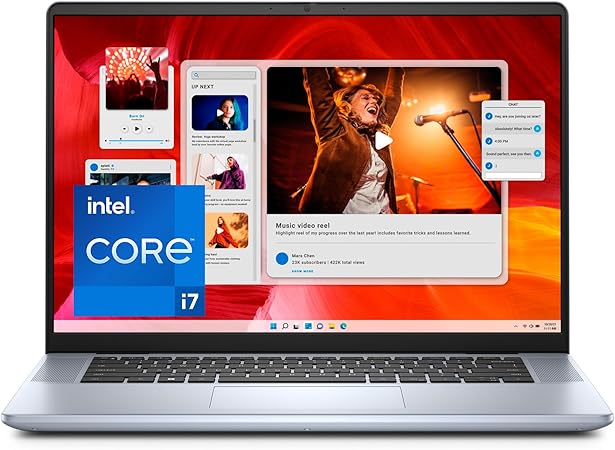
Dell Inspiron 16 Plus 7640 Laptop – An In-Depth Review


The Dell Inspiron 16 Plus 7640 is a high-performance laptop tailored for users who demand a balanced blend of power, portability, and display quality. With its 16.0-inch 2.5K display, 13th Gen Intel Core i7 processor, generous memory and storage, and Windows 11 Home, this machine positions itself as an ideal choice for both productivity and entertainment. In this review, we take a comprehensive look at each aspect of the Inspiron 16 Plus 7640 to help you determine whether it fits your needs.

Design and Build Quality

The Inspiron 16 Plus 7640 has a modern, clean aesthetic. Dell has used aluminum on parts of the chassis, which gives it a premium feel compared to plastic-bodied alternatives. The build quality is solid, with minimal flex on the lid and keyboard deck. Weighing approximately 4.4 pounds and measuring just under an inch in thickness, it maintains a good balance between screen size and portability. This makes it suitable for professionals and students alike who need a larger screen but still want something reasonably mobile.

The minimalist design extends to the keyboard and trackpad area. The keys are well-spaced and have decent travel, providing a comfortable typing experience for extended sessions. The touchpad is large, responsive, and supports multi-touch gestures fluidly. The backlit keyboard adds a layer of convenience in low-light conditions, which is useful for late-night work or travel.

Display

One of the standout features of the Dell Inspiron 16 Plus 7640 is its 16.0-inch 16:10 aspect ratio display with a 2.5K (2560 x 1600) resolution. The 16:10 format offers extra vertical screen real estate compared to the traditional 16:9, which is particularly beneficial when scrolling through documents, working on spreadsheets, or browsing the web.

The display itself is sharp, with crisp text and vibrant colors, making it well-suited for media consumption and creative work. Brightness levels are adequate for indoor environments, though it may struggle under direct sunlight. The color accuracy is sufficient for general use, and while it may not meet the standards of professional photo editors or graphic designers, it’s more than acceptable for casual creative tasks and high-definition streaming.

Performance

Powering the Inspiron 16 Plus 7640 is the Intel Core i7-13620H processor, part of Intel’s 13th generation lineup. This chip brings ten cores (six performance cores and four efficiency cores) and high boost clock speeds, making it highly capable for both multitasking and demanding applications. Paired with 16GB of LPDDR5 RAM, the laptop delivers snappy performance across a wide range of use cases.

Whether you’re working with large Excel files, editing photos in Lightroom, managing virtual machines, or switching between dozens of browser tabs, the system handles tasks with ease. The use of LPDDR5 memory ensures faster bandwidth and lower power consumption, contributing to both performance and battery life improvements.

The integrated Intel UHD Graphics are serviceable for basic graphical tasks, such as streaming high-definition content, photo editing, and casual gaming. However, this laptop is not intended for intensive gaming or high-end 3D rendering. For users who need powerful graphical performance, a model with a dedicated GPU would be a better fit.

Storage

The 1TB solid-state drive (SSD) is a highlight in the Inspiron 16 Plus 7640, offering ample space for applications, games, work files, and media. The SSD ensures quick boot times, fast file access, and smooth overall responsiveness. Dell uses NVMe technology in this drive, which brings significant performance gains compared to older SATA-based SSDs.

This generous storage capacity makes it ideal for users who deal with large files, such as video editors or software developers, and eliminates the need to carry an external drive for most purposes.

Operating System and Software

The laptop ships with Windows 11 Home, which provides a refreshed user interface, improved productivity features, and better support for touch and pen inputs. The redesigned Start menu, snap layouts, and integration with Microsoft Teams are especially helpful for business users and remote workers.

Dell includes some of its proprietary utilities like Dell SupportAssist, which helps manage system updates, performance tuning, and troubleshooting. Fortunately, the system is relatively free from excessive bloatware, allowing users to personalize their setup without needing to uninstall unwanted software.

Ports and Connectivity

The Inspiron 16 Plus 7640 offers a versatile selection of ports. Users get USB-C, USB-A, HDMI, and a headphone jack, which covers most everyday use cases. The inclusion of USB-C enhances compatibility with modern peripherals and allows for fast data transfer and charging. The HDMI port makes it easy to connect to external displays or projectors, which is useful for presentations or dual-screen setups.

Wireless connectivity is strong, with Wi-Fi 6 support providing faster and more reliable internet access compared to previous generations. Bluetooth is also available for connecting wireless peripherals like headphones, keyboards, and mice.

Battery Life

Battery life on the Inspiron 16 Plus 7640 is respectable, especially for a device with a high-resolution display and powerful processor. Under moderate usage—such as browsing, video streaming, and document editing—you can expect around 7 to 9 hours of use on a single charge. More intensive tasks like video editing or heavy multitasking will shorten that number, but for most users, the battery will comfortably last through a work or school day.

Onsite & Migrate Service

Dell includes Onsite and Migrate Service as part of the package. Onsite service provides added peace of mind, with technicians available to perform repairs or diagnostics at your location in case of hardware issues. The Migrate Service helps users transfer data and settings from an older machine to the new Inspiron, easing the transition and reducing setup time. These services add real value, especially for non-tech-savvy users or professionals who can’t afford prolonged downtime.

Final Thoughts

The Dell Inspiron 16 Plus 7640 strikes a solid balance between performance, screen size, and portability. Its high-resolution 16:10 display, powerful 13th Gen Intel processor, fast LPDDR5 memory, and spacious 1TB SSD make it a strong contender in the premium mid-range laptop market.

While it’s not intended for hardcore gamers or users needing discrete graphics, it excels as a productivity workhorse, media machine, and general-purpose laptop for professionals, students, and casual creators alike. With the added benefits of onsite support and migration assistance, it provides a user-friendly, dependable experience right out of the box.

See The Dell 7640 On Amazon!

HP OmniBook 3 17.3-Inch Laptop PC (17-dp0199nr) Review

  The HP OmniBook 3 17.3-inch Laptop PC (17-dp0199nr) is designed for users who want a large display, dependable everyday performance, an...